

Is prompt tracking worth it?
I have a love-hate relationship with prompt tracking: It started as “not accurate, but at least it’s something” and then I spoke out against it for two reasons:
- It’s inconsistent: The same prompt gives a different answer almost every time you run it. In Rand Fishkin’s SparkToro research, published in January 2026, 600 volunteers ran 12 prompts through ChatGPT, Claude and Google’s AI 2,961 times and got the same list of brands back less than 1% of the time.
- First-party tracking comes first: My advice has always been to set up your tracking and attribution properly before anything else, because that is where you measure clear commercial impact.
My work on query fan-outs and hands-on time with several prompt trackers showed me it can provide insight. The condition is that you accept that prompts and fan-outs keep changing: Any change you make on the back of it needs to hold for the long term, or you need to be ready to change it again.
What prompt tracking can and can’t tell you
Read as a trend across multiple runs, prompt tracking can show you:
- Competitive gaps: Who the AI names when it leaves you out.
- Sentiment: How it describes you.
- Citations: Which of your pages it trusts as a source and which competitor pages it picks over yours.
- Accuracy: Where it gets your facts wrong.
What it can’t tell you:
- A ranking: There’s no stable first place in an AI answer, so a rank only describes one run.
- What any one person sees: Memory, personalisation and location shape every answer.
- Prompt volume: No AI platform shares how often a prompt is asked, so a prompt set measures coverage and says nothing about demand.
- Commercial impact: Visits, sign-ups and revenue from AI search only show up in your own tracking.
The caveat to all of this is, of course, the inconsistency I started with. Rand’s research found more than different lists: The same order came back about once in 1,000 runs and some answers named 2 or 3 brands where others named 10 or more. As he puts it: “These tools are probability engines: they’re designed to generate unique answers every time.” One finding works in prompt tracking’s favour, though: When 142 of his volunteers wrote their own prompts about headphones for a travelling family member, barely two were alike, yet Bose, Sony, Sennheiser and Apple still showed up in 55% to 77% of the 994 answers. The AI answers the intent behind the words, which is why I care far more about the share of runs you appear in than about any single answer. Memory and personalisation add to the noise, since answers are shaped around the person asking. His volunteers kept their usual settings, the way real users do.
So I treat prompt tracking as an exercise to assess whether your brand is present in the contexts you care about most: Is the context correct, what’s the sentiment around it, is your page cited and are your competitors cited instead? That gives you an opportunity to own the narrative, which is why the first round of results is so telling. Most advice on the subject stops at where to find prompts, while my frameworks decide which ones to track.
TL;DR: 3 prompt tracking frameworks and a free skill to build your prompt set
The goal of this post is to share my own prompt tracking frameworks (by buyer expertise, by funnel stage or both) for setting up prompt tracking that gives you actionable insights, even though the outputs can change every time you run them. It also gives you a starting point for choosing the framework that fits what you most need to know. Each of these 3 prompt tracking frameworks answers a different question and a free skill helps you choose:
- By buyer expertise: Which buyers does the AI recommend you to, from first-timer to expert?
- By funnel stage: At which stages of the buying journey does your brand appear in the answers?
- Both, in a buyer journey matrix: Where exactly does your brand appear, by buyer level and stage, for one product?
- A free skill for any LLM: It recommends the right framework based on your needs and crafts sample prompts for you.
Once you’ve chosen your framework, I go through how to craft prompts that are consistent with how LLMs usually fan out a question: One intent, one entity and one context. What you’ll need: Your brand, buyers and competitors, the question you most need answered, real queries from Google Search Console and Bing Webmaster Tools and what your brand team knows about each buyer.
When you’re happy with the set, run it by hand to stress test it, then add the prompts to your prompt tracking tool of choice in clusters or groups and it does the rest: AI visibility for the whole cluster, whether you’re mentioned, cited or neither, sentiment analysis and so on.
How to choose and set up prompts to track: My 3 frameworks
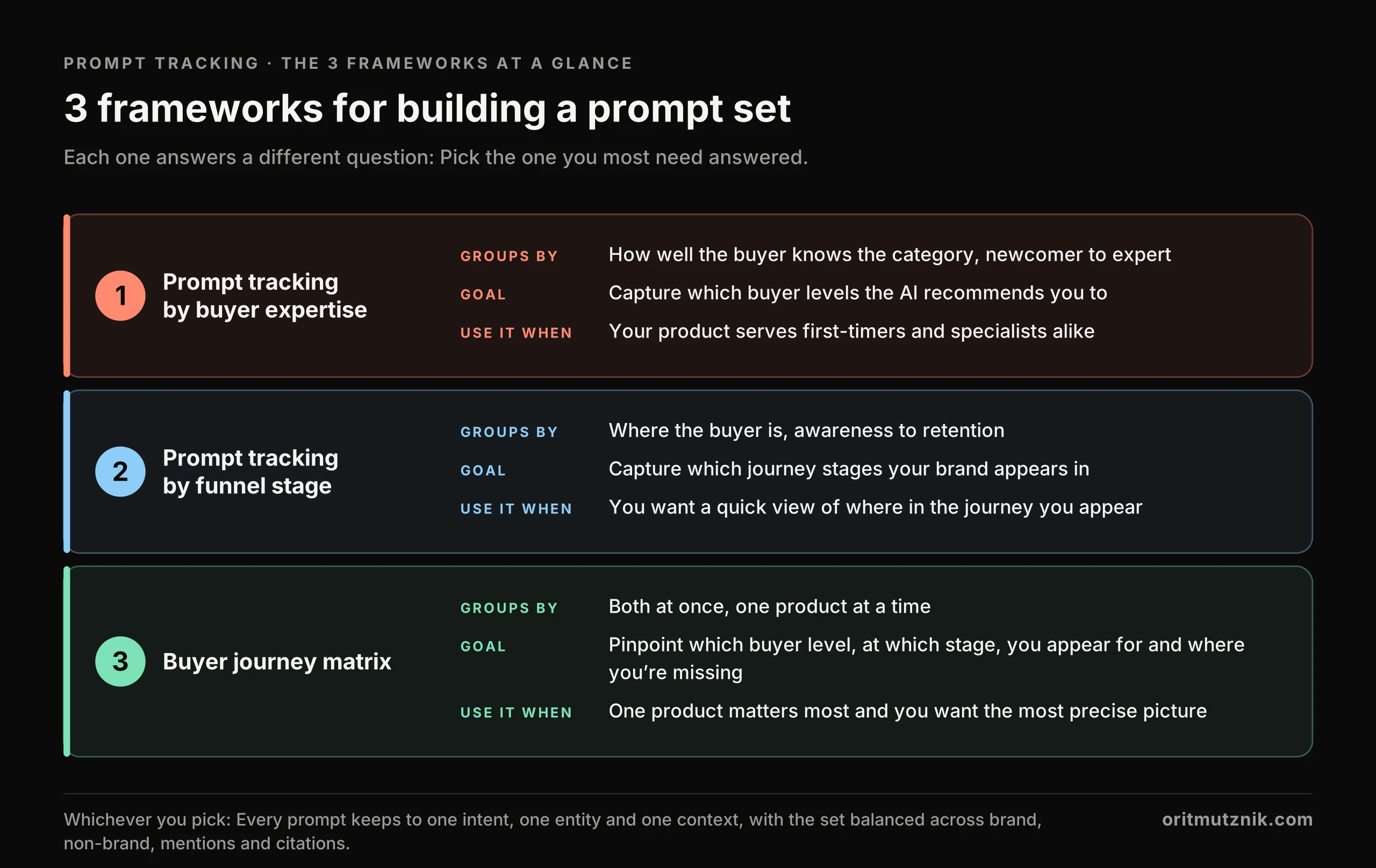
Pick one of my 3 prompt tracking frameworks by the question you most need answered. The table and image below sum them up and the next 3 sections break them down: The logic behind each one, its goal, how to build it and when I recommend it.
| Framework | Groups prompts by | Answers | Best for | Prompts |
|---|---|---|---|---|
| 1. By buyer expertise | 5 levels, newcomer to expert | Which buyers the AI recommends you to | Products that serve first-timers and specialists alike | 25 (5 per level) |
| 2. By funnel stage | 5 stages, awareness to retention | At which stages your brand appears | A quick first read, or teams that report by funnel stage | 25 (5 per stage) |
| 3. Buyer journey matrix | Both, 5 levels by 5 stages | Which buyer level, at which stage, your brand appears for | The one product that matters most | 25 to 50 (1 or 2 per cell) |
Free skill: Or let the prompt tracking skill interview you, pick the framework and suggest a set for you (how to use it).
Framework 1: Prompt tracking by buyer expertise
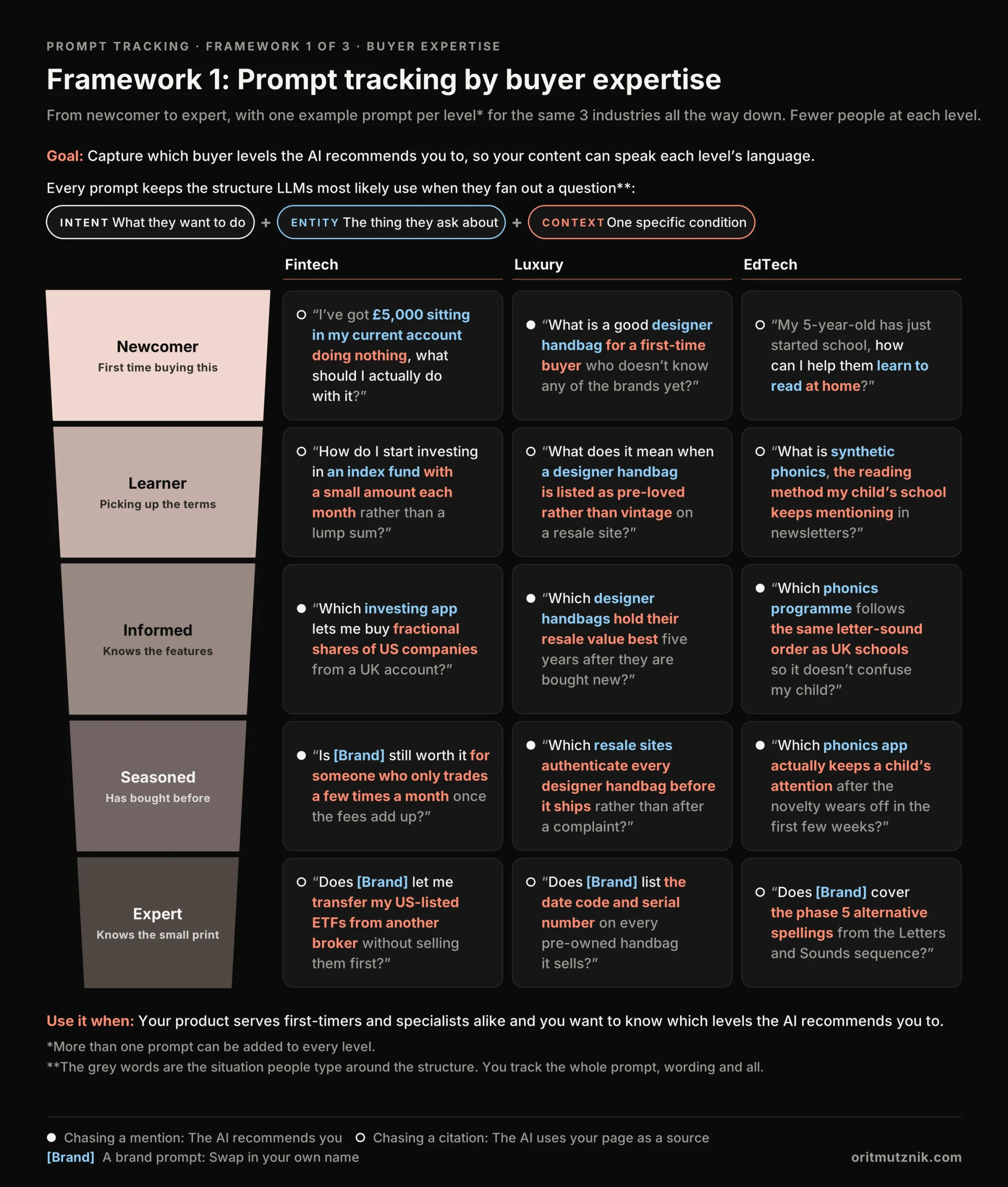
This framework starts from one observation: Buyers ask about the same product in different words depending on how well they know the category. A newcomer to investing asks what to do with £5,000 sitting in a current account, while an expert asks whether a platform lets them transfer US-listed ETFs from another broker without selling them first. The AI answers each vocabulary differently, so a set written in one vocabulary only shows you one type of buyer.
Goal: Capture which buyer levels the AI recommends you to, so your content can speak each level’s language.
The 5 buyer expertise levels
The 5 levels work in any industry (the image has one example prompt per level for fintech, luxury and EdTech):
- Newcomer: Plain words and no category terms, often with no product named.
- Learner: Names the category and asks what things mean.
- Informed: Asks for features by name.
- Seasoned: Asks about the catches, like fees, returns and what goes wrong.
- Expert: Asks about the small print most people never reach.
How to build the buyer expertise prompt set
- Pick the product line you care about most, because the levels are written per product. A brand with several products builds one set of levels for each.
- Sit down with your brand or marketing team (preferably) and write down how each level talks about it. Their input matters most in this framework, because they hold the persona research and the sales calls that show each level’s vocabulary. Every level needs a clear, proper description, because the prompts are only as good as the descriptions.
- Write 5 prompts per level in the prompt structure, starting from the real queries that fit each level: Long queries from Google Search Console and Bing Webmaster Tools and the prompts your AI visibility tool (e.g. Ahrefs Brand Radar) already tracks. Fill the gaps in that level’s own words, then tag them.
- Track by level, so the report reads “named for informed buyers, missing for newcomers” and the fix is obvious.
When I recommend it: Your product serves first-timers and specialists alike (e.g. investing apps, software, luxury and education) and you suspect the AI recommends you to one level only. If you appear for experts but not for newcomers, the gap is usually your content. The other way round, it’s usually reviews and third-party coverage.
Framework 2: Prompt tracking by funnel stage
This framework works because the stage of the buying journey decides what people ask for: Explainers early on, comparisons in the middle, fact checks at purchase and stay-or-leave questions at retention. Each of those targets a different result, so a set built by stage shows at which stages the AI brings you in and at which it doesn’t. Retention is the stage prompt sets most often miss, even though existing customers ask AI assistants whether to stay and the answer can name a competitor.
Goal: Capture which stages of the journey your brand appears in, from the first explainer to the decision to stay.
The 5 funnel stages and what each targets
- Awareness: Spotting the need with no product in mind, so the prompt targets a citation.
- Interest: Learning how to solve it, which aims for a citation too.
- Consideration: Comparing options, which chases a mention.
- Purchase: Ready to buy and checking the facts, usually in a brand prompt that targets a citation.
- Retention: Using the product or thinking of leaving, in a brand prompt that aims for a mention, where a competitor can get named.
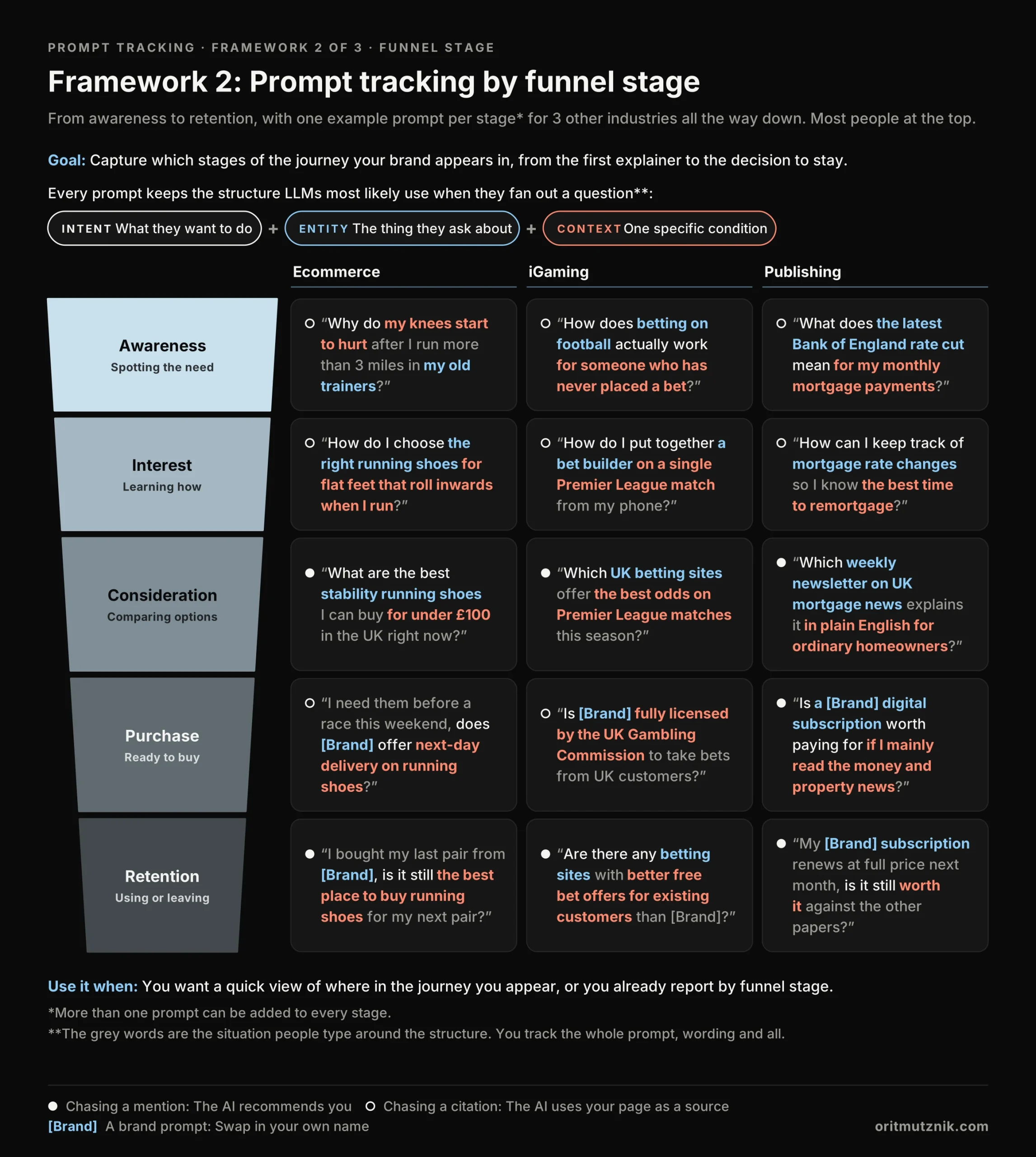
Reading the results is the useful part: If you’re cited at awareness but missing at consideration, the AI uses your explainers as a source but recommends other brands when buyers compare. Those recommendations usually come from review sites and “best X for Y” lists, so that’s where you need to get named. At purchase and retention the prompts name you, so what you capture there is how you’re described, whether the facts are right and whether a competitor gets recommended instead.
How to build the funnel stage prompt set
- Write 5 prompts per stage for one product line, in the same structure and starting from the real queries that fit each stage, from Search Console, Bing Webmaster Tools and your AI visibility tool. SEO can build most of it, since it’s close to keyword research by intent. The brand team only needs to check the stage descriptions and the awareness prompts, where the buyer has no product in mind yet. Each product line gets its own funnel, so a multi-product brand ends up with one of these per product.
- Make the retention prompts the ones that could lose a customer: “Is it still worth it”, “a cheaper alternative to”, “better offers for existing customers than”. Support questions like “how do I cancel” tell you less about visibility.
- Tag the prompts and track by stage: Expect more non-brand citations than any other kind, because awareness and interest ask for explainers.
When I recommend it: You want a quick view of where in the journey you appear, you already report by funnel stage or the brand team has little time to give. I also use it for every product line beyond the top one or two.
Framework 3: The buyer journey matrix
Framework 3 puts frameworks 1 and 2 in one table for one product: Buyer levels down the side, funnel stages across the top and one or two prompts where each level meets each stage. Each of those 25 boxes answers one simple question, like “does the AI recommend us to seasoned buyers who are comparing options?” Read across for one level’s whole journey, or down for everyone at one stage.
Goal: Pinpoint which buyer level, at which stage, your brand appears for and where it’s missing, because “we’re missing for seasoned buyers at consideration” is something a content team can act on next week.
The matrix also works as your core prompt set: Its 25 prompts are the minimum I recommend in my AI search visibility audit and two prompts per cell take you to 50, about the most anyone keeps running per product.
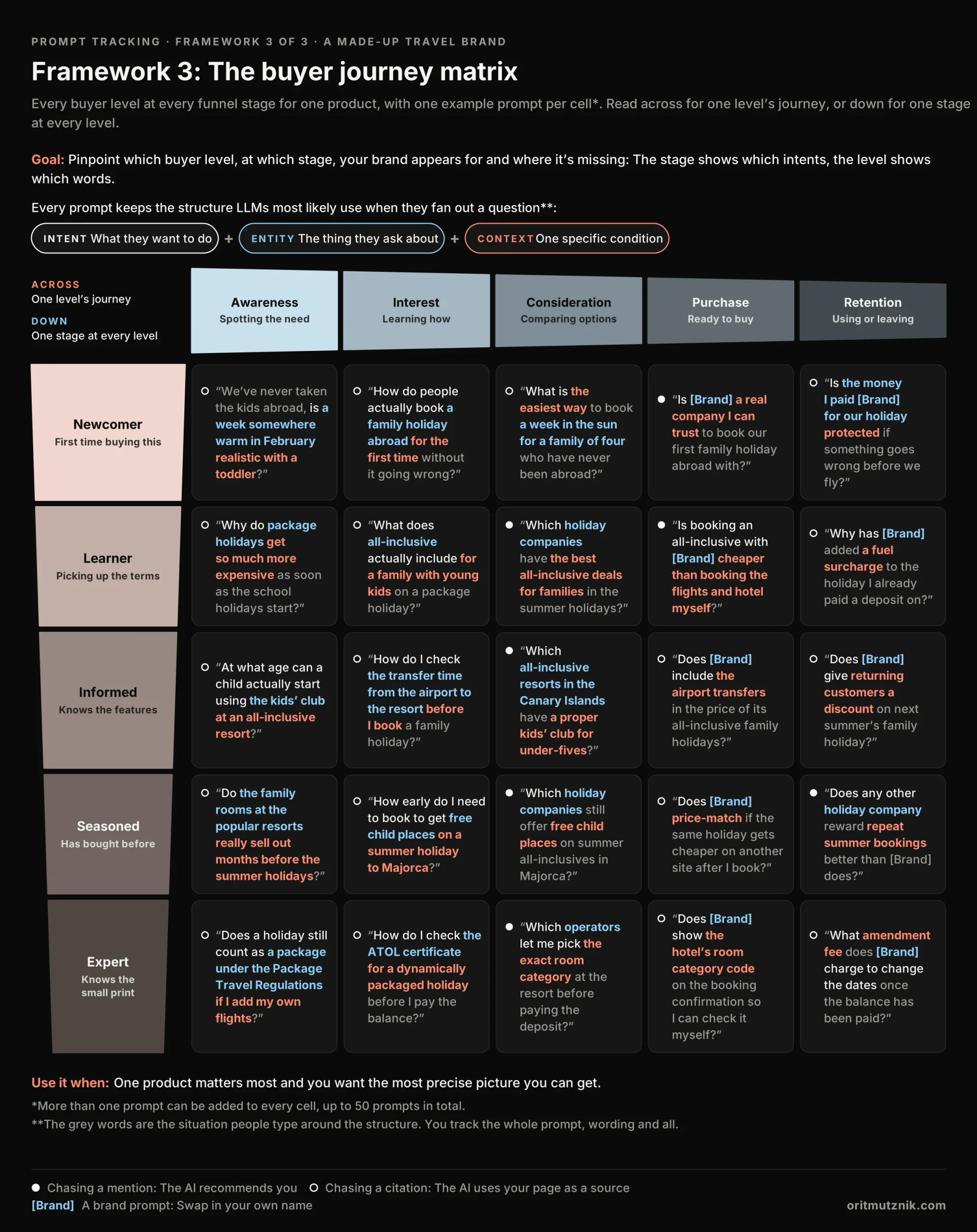
How to build the buyer journey matrix
- Pick one product, the one that makes the most money. A multi-product brand builds a matrix for each of its top products and uses framework 2 for the rest.
- Write the 5 levels with the brand team, as in framework 1, then fill each row across the 5 stages, keeping every prompt to one context and starting from a real query from Search Console, Bing Webmaster Tools or your AI visibility tool wherever one fits.
- Ask the brand team to review the rows, because they know which rows actually buy, then tag the prompts and track by level and stage. Keep the matrix to one product at a time, because each one needs the brand team to describe and review 5 levels across 5 stages.
When I recommend it: One product matters most, you want the most precise picture you can get and the brand team can review the rows. It’s the most work of the 3.
The anatomy of an effective prompt
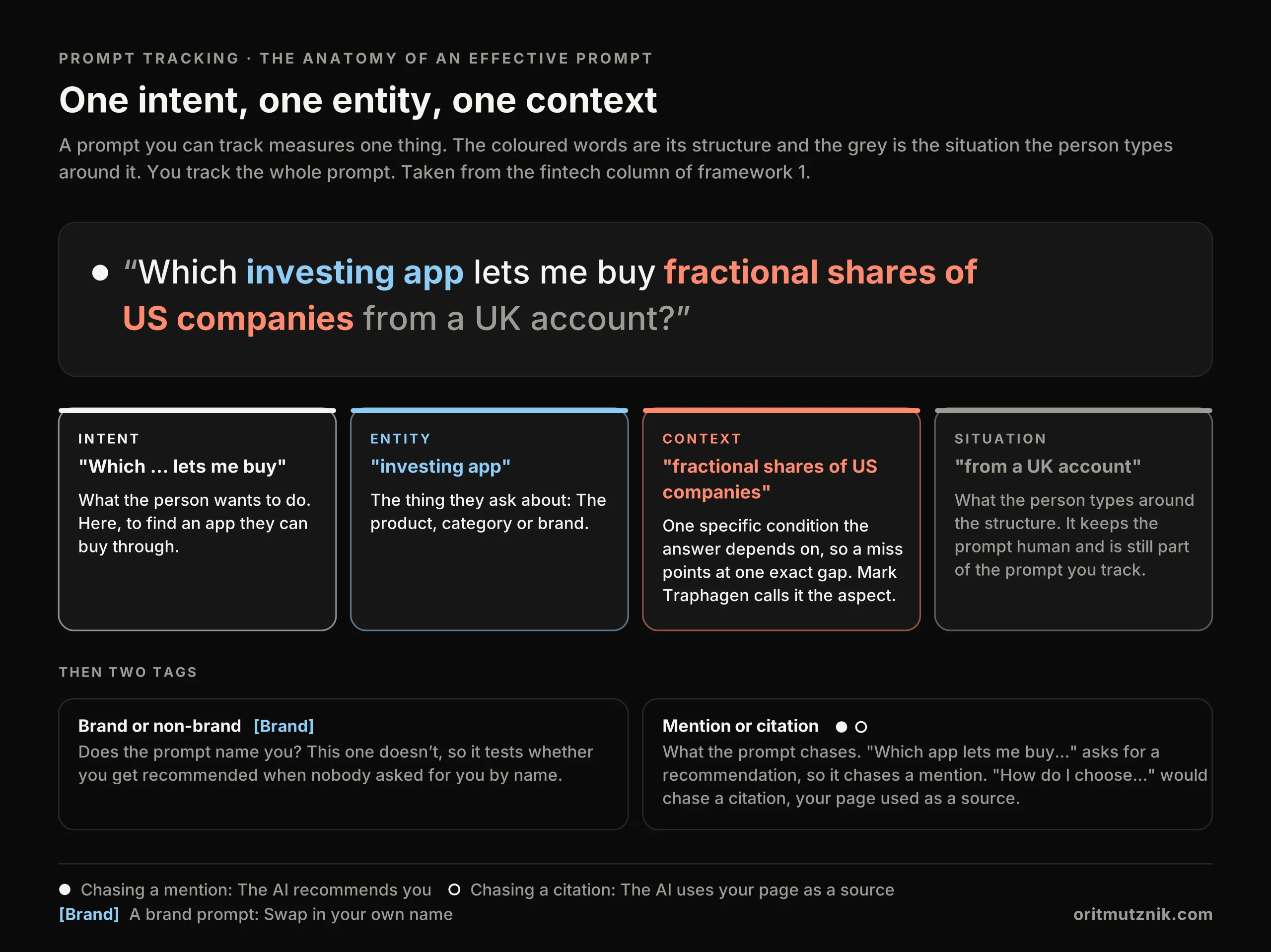
As for the prompts themselves: I was working on my frameworks and thinking about an underlying pattern for the example prompts per industry, persona and stage. Then Mark Traphagen put my thoughts into a structure in Stop Chasing Every Prompt: A Simple Framework for AI Prompt Tracking, in September 2026: One intent, one entity and one aspect per prompt. It makes complete sense and I’ve built it into how I create prompts, which has helped breathe life into the prompt tracking frameworks above.
I made one change: I call the third part the context instead of the aspect. In a real prompt it’s the condition that frames the whole answer (a budget, a location, a feature or a level of experience) and that’s how LLMs usually fan out a question into searches, adding one piece of context at a time. Every prompt has:
- One intent: What the person wants to do.
- One entity: The thing they ask about.
- One context: One specific condition the answer depends on, so a miss points straight at the gap. If you don’t show up for “which investing app lets me buy fractional shares”, you know exactly where to look.
Everything else is the situation people type around it, like “from a UK account”. It keeps the prompt human and you still track the prompt as a whole.
The two tags: Brand or non-brand, mention or citation
Every prompt also gets two tags and the second says what the prompt chases, meaning the result that counts as a win: A mention or a citation.
- Brand or non-brand: A brand prompt names you and shows how the AI presents you, while a non-brand prompt shows whether you get recommended when nobody asked for you by name.
- Mention or citation: “Which one should I buy” chases a mention, where you are named as a recommendation, while “how do I choose” chases a citation, where your page is used as a source. In brand prompts, a verdict (“is it worth it”) chases a mention and a fact check (“does it deliver next day”) chases a citation.
Write each prompt the way a person types into an LLM, with their situation around the question. In every 25 prompts of your prompt set, keep at least 4 of each combination: Brand mention, brand citation, non-brand mention and non-brand citation. I leave competitor names out of the prompts: They get tracked in the answers, which show who the AI names in your place.
Where the real prompt wording comes from
Whichever framework you pick, start from real queries and invent as little as possible:
- Google Search Console and Bing Webmaster Tools: The long questions people already type, which the regex section pulls out.
- AI visibility tools: The prompts Ahrefs Brand Radar already tracks for the brand.
- Your own teams: How the brand team says each buyer talks, plus sales call notes, support tickets and reviews.
- Your LLM of choice: Use it with caution, because its prompts are the least likely to be real user prompts. It works best when you feed it the data from the 3 sources above to refine your prompts or draft them per level or stage. Give it your brand, your level or stage descriptions and the real queries, so it maps each query, rewrites it into the structure and only then fills the gaps. That’s what the free skill does with you.
How to find real AI prompts in Google Search Console and Bing Webmaster Tools
AI conversations now leak into Search Console as queries, mostly from Google’s AI Mode, which counts towards the Performance report, with some ChatGPT searches mixed in, as Jason Packer found - that makes it the best free source of real prompt wording I know. A few SEOs have shared regex filters that pull those queries out, which you add in the Performance report, under Query, as a custom regex:
- Long, conversational queries:
^(?:\S+\s+){9,}\S+$, which Chris Long shared on Search Engine Land in February 2026, pulls out queries of 10 words or more, the ones that read like prompts. - ChatGPT fan-outs:
(?i)(site:.*official|official.*site:), which Lily Ray shared on X, catches the queries that pair site: with “official”. - Replies to drop:
^(yes|yeah|ok|okay|sure)[?!.,]*$finds bare replies like “yes”, which tell you nothing on their own. It comes from Suganthan Mohanadasan’s write-up in August 2026, which sorts AI conversation fragments into 7 buckets. - Prompt verbs and follow-ups: Jean-Christophe Chouinard’s longer regex catches both in one filter.
- Bing queries: Bing Webmaster Tools has the same kind of query report under Search Performance, with no regex filter, so export the queries and sort them by word count in a spreadsheet.
- Copilot grounding queries: Bing’s AI Performance report, in public preview since February 2026, lists the key phrases Copilot used to find the content it cited. They read like fan-outs, so use them to check which contexts you cover, while the prompts themselves come from real questions.
Export what’s left from both consoles, group it per product with an AI and rewrite every keeper into the structure before it goes into your framework. The two consoles cover Google’s and Microsoft’s side, so pair them with your AI visibility tool’s prompt library for ChatGPT, Claude and Perplexity.
Free prompt tracking setup skill (works with any LLM)
If you’d rather not build the set by hand, the skill does the whole setup in one chat. It’s one text file, so it works in ChatGPT, Claude, Gemini, Copilot or Perplexity:
- Download it: Save the prompt tracking skill, a plain text file.
- Attach it to a new chat: Every one of them accepts file attachments, so attach the file and send it with the words “Build my prompt set”.
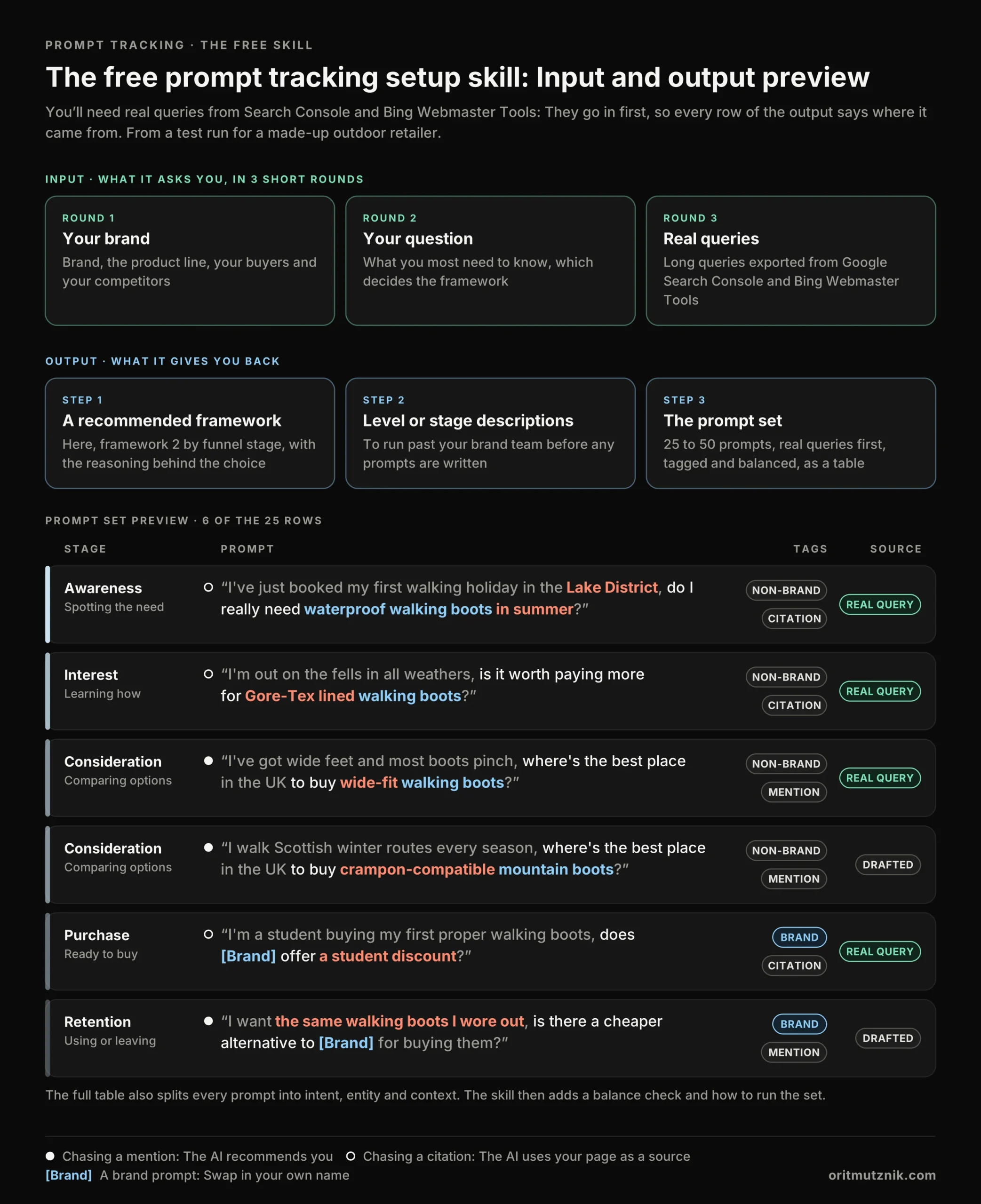
- Answer its questions: In 3 short rounds it asks about your brand, buyers and competitors, what you most need to know and the real queries you’ve pulled from Search Console or Bing.
It then recommends one of the 3 prompt tracking frameworks and provides the reasoning behind this choice. It describes the levels or stages for you to run past your brand team, then writes 25 to 50 prompts in the structure, real queries first, tagged and balanced, as a table you paste into any spreadsheet. Here’s a preview of the input and output from my test run for a made-up outdoor retailer:
How to run your prompt set and report AI visibility
Whichever framework you pick, running the set is a two-step process: By hand first, then in a prompt tracking tool.
Step 1: Run it manually to stress test your framework
I always run a new set by hand before I set the prompt clusters up in a prompt tracking tool. Here’s the short version of stage 4 of my AI search visibility audit:
- Check the fit: Do the prompts sound like your buyers and do the levels or stages return different answers?
- Run it more than once: A single run is only a snapshot, so put every prompt through every platform several times.
- Switch off personalisation: Stay logged out where you can, or turn memory and personalisation features off.
- Run it per market: Answers change by country, so run the set in each market, in that market’s language.
- Keep the set fixed: Changing prompts between runs breaks the trend, so use the same set every time.
- Report a percentage: The share of runs where you’re mentioned or cited (Rand Fishkin’s metric), with brand prompts kept apart.
Step 2: Set it up in a prompt tracking tool
Once the set holds up, add the prompt clusters to a tool (e.g. Profound, Peec AI, Ahrefs Brand Radar or SE Ranking’s SE Visible), which runs them for you:
- Group the prompts: Add them by level, stage or both, with their tags, so every report matches your framework.
- Pick platforms and markets: Choose the AI platforms in scope and set each market’s country and language.
- Set a schedule: Weekly runs give the trend enough data points, so mark every major model release on it.
- Read the reports by group: Visibility, mentions, citations, sentiment, the sources used and competitors named in your place.
- Keep spot-checking: A tool doesn’t always see what a logged-in user sees, so test your key prompts by hand.
That first manual run is your stress test: If the answers don’t split cleanly by level or stage, switch to another framework. If they do, the framework is a keeper and you can duplicate it for each of your other products.
A side note on query fan-outs
Fan-outs are where the engine actually finds brands: The sub-queries show which contexts the LLM searches for and the pages it fetched show who got the mention when you didn’t. Once the set exists, run your most commercial prompts through my Fanout Explorer bookmarklets to see them. Several tools now capture the fan-outs behind every tracked prompt automatically, among them Profound, Peec AI, Ahrefs Brand Radar and SE Ranking’s SE Visible, so check yours before doing it by hand.
Where to start with prompt tracking
If you’re not sure where to start, framework 2 (by funnel stage) gives you the fastest first read, framework 1 (by buyer expertise) fits buyers who range from first-timers to specialists and framework 3 (the buyer journey matrix) is for the one product that carries the business. Your first round of runs is the most telling, so keep the set fixed, read the results as a trend and keep fixing your first-party tracking alongside it, because that’s still where the commercial impact shows up.
Prompt tracking FAQs
What is prompt tracking in AI search?
Prompt tracking is running a fixed set of prompts through AI assistants on a schedule and recording the answers: Whether your brand is mentioned or cited, how it is described and which competitors get named instead. Read as a trend across many runs, it shows where your AI visibility is strong and where it’s missing.
Which prompts should I track in AI search?
Track the prompts your buyers actually ask, grouped so each result points to a fix: By buyer expertise (newcomer to expert), by funnel stage (awareness to retention) or both in a buyer journey matrix. Start from real queries in Google Search Console and Bing Webmaster Tools and write each one with one intent, one entity and one context. Keep 25 to 50 per product, balanced between brand and non-brand prompts and between mentions and citations.
Is prompt tracking accurate?
Only as a trend, because the same prompt returns a different list of brands almost every time: SparkToro found the same list less than 1% of the time across 2,961 runs. So report visibility as a percentage across many runs and read the direction it moves in.
How many prompts should I track in AI search?
Between 25 and 50 per product, kept fixed between runs: That’s 5 per level or stage for frameworks 1 and 2 and one or two per cell for framework 3. Below 25 no pattern shows, above 50 nobody keeps running it and a set that changes every month cannot show a trend.
What is the difference between a mention and a citation in AI search?
A mention is the AI naming you as a recommendation, which is what “who should I buy from” prompts chase. A citation is the AI using one of your pages as a source for its answer, which is what “how do I choose” prompts chase. A balanced set has both, for brand and non-brand prompts.
Should the brand team be involved in prompt tracking?
Yes, wherever you can get them, because all 3 prompt tracking frameworks lean on how buyers talk. Framework 1 (by buyer expertise) works best with them, because the vocabulary of each buyer level is their territory. Framework 2 (by funnel stage) needs them to check the stage descriptions and awareness prompts, while framework 3 (the buyer journey matrix) gets better with their review of the rows.
Work with me on your AI search prompt tracking
If you want a second pair of eyes on your prompt set, or help choosing the framework that fits the brand and getting the brand team into the room, tell me what you are tracking.