

Sep 23, 2026 Update: What changed in ChatGPT and Fanout Explorer
On the 18th of September William Montenegro Ferrari let me know that ChatGPT Fanout Explorer was coming back empty. By then ChatGPT had changed what it saves with a chat and the bookmarklet, built for the old format, showed nothing at all instead of the parts that were still there. I fixed it and rebuilt it around what ChatGPT still exposes, so the bookmarklet remains useful, valuable and unique:
What ChatGPT no longer exposes
- The freshness window and the site limit: Gone from every account type, on new chats and old. Everything marked with an asterisk below is what the tool returned on the day I ran it and cannot be reproduced today. The data only says ChatGPT stopped showing a window, not that it stopped applying one.
- The query text in saved chats: On personal accounts, free and Plus alike, ChatGPT no longer saves the queries with the chat (Work workspaces on paid accounts still do), which means a chat opened from your history shows the pages it fetched and cited with no query text next to them.
- Click the bookmarklet before you prompt to capture the queries: In the previous version you could open any saved chat and read its queries. Now they only exist while ChatGPT answers, so to capture them you run the prompt live with the bookmarklet on. Once you have, they are saved in your browser and you can come back to that chat any time. Chats from before the update, like any chat opened after the fact, show their pages and citations with the query marked as not captured.
- Queries for follow-up batches: ChatGPT streams only its first batch of queries to your browser while it answers. Later batches show their pages and citations without the query, labelled follow-up batch (7 in the screenshot below).
- Fan-outs when logged out: Logged-out ChatGPT still searches, but it is now a separate app that only sends the cited links to your browser, never the queries or the pages it fetched. The bookmarklet needs you logged in, free or paid.
What’s new for ChatGPT Fanout Explorer?
With the query text gone from saved chats and the freshness window and site limit gone altogether, the bookmarklet had lost two of the columns that set it apart. So I rebuilt it around what ChatGPT still exposes and other fan-out tools rarely surface, if at all: The queries as they stream, how old the pages it fetched and cited were, the brands it went looking for before a single result came back and the snippet it judged every page on. The numbers below match the screenshot.
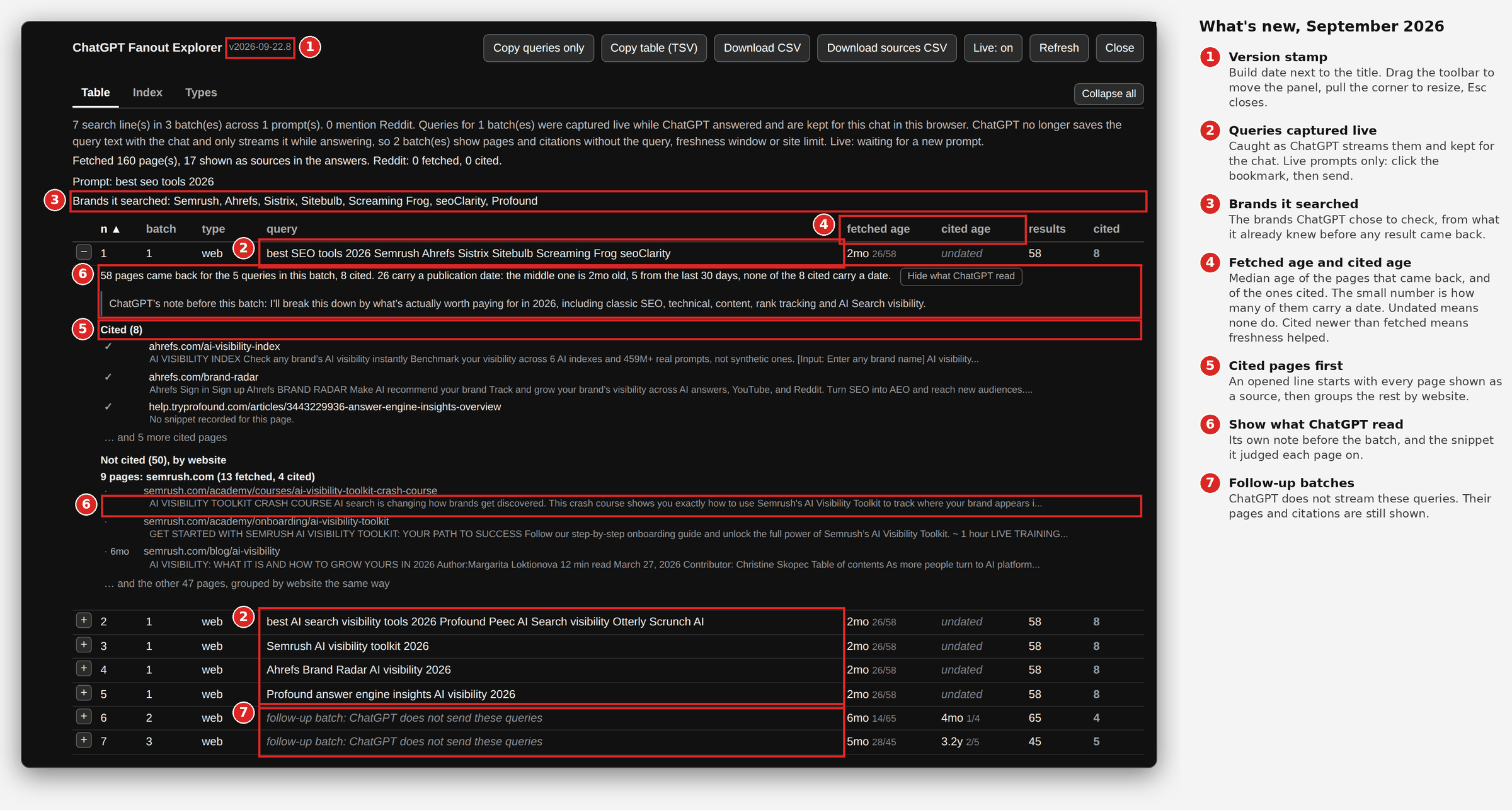
- Version stamp (1): The build date next to the title, so a stale install is obvious. The panel can also be dragged by its toolbar, resized from the corner and closed with Esc. It remembers where you put it.
- Queries captured live (2): The first batch of queries, caught as ChatGPT streams them and kept for that chat in your browser. Work workspaces still keep the queries in the saved chat and those are read too.
- Brands it searched (3): Under the prompt, the brands ChatGPT chose to check, meaning a name in a query that matches a website that came back. The first batch is written before a single result arrives, so these come from what the model already knows, plus your memory and custom instructions if they are on.
- Fetched age and cited age (4): The freshness window is gone, but ChatGPT records a publication date for many of the pages it fetches. Fetched age is the median age of the pages that came back for the batch, cited age the median of the ones it cited, each with a small count of how many pages carry a date. Cited newer than fetched means freshness helped those pages get picked. Undated means none of them carry a date, which is usual for product and help centre pages. Hover a cell for the newest, the oldest and how many are from the last 30 days.
- Cited pages first (5): An opened line starts with every page shown as a source, then groups the rest by website with each site’s fetched and cited counts.
- Show what ChatGPT read (6): A switch that appears when you open a line and adds two things. Under each page, its snippet: The short extract of the page that ChatGPT’s search tool returned, which is all it had to go on unless it opened the page. Above the list, ChatGPT’s working note: The one-line plan it wrote before running the batch, such as “I’ll break this down by what’s actually worth paying for in 2026”. Both go into the sources CSV. CSV file names now carry the chat title.
- Follow-up batches (7): A batch ChatGPT never streamed says so in the query cell instead of sitting empty.
Fixed
- The panel no longer gets cut off or stuck off screen, moving between chats no longer trips ChatGPT’s “too many requests” error and the reader is lighter overall: It stops reading once an answer is done and never reads from a background tab.
If you installed before
- Short bookmark (the default): It updates itself. Open ChatGPT, click it and check the stamp reads v2026-09-22.8. If it does not, hard refresh the install page and drag the button again.
- Standalone version: It does not update itself. Drag the new button from the install page and delete the old one.
- Old chats: They show query not captured for good. ChatGPT never sent those queries, so no version can bring them back. Run the prompt again in a new chat with the bookmark on.
The current version is on GitHub and every change is listed under what changed on the install page. Claude and Gemini are not affected.
TL;DR: What Fanout Explorer is and where to get it
- What it is: ChatGPT Fanout Explorer is a free bookmarklet: One button you drag onto your bookmarks bar, nothing to install.
- What it does: Click it on any ChatGPT chat and it lists the query fan-out behind your prompt, meaning every search ChatGPT ran: The type of search, the exact query, how many pages came back, how old they were and how many of those made it into the answer as a source. It works live while ChatGPT answers and on saved chats. Since September 2026 live is the only way to catch the queries, while a saved chat gives you the pages and citations.
- Why I vibe coded it: Suganthan Mohanadasan published a finding about ChatGPT searching Reddit with 365 and 3,650 day (1 and 10 year) windows. His FanoutFox extension and Nati Elimelech’s fan-out extension both show those fan-outs in depth, while I wanted one part of that picture, quickly and in one place, for a prompt I had just sent or a chat already in my history: The searches ChatGPT ran, the pages each one returned and which of them were cited. That view exists in ChatGPT’s conversation data in DevTools and deeper inside FanoutFox, but I wanted it in one click.
- Where to get it: Open the install page, drag the button to your bookmarks bar, then click it on any ChatGPT chat. Free, read-only and everything stays in your own browser.
- Reddit, sourced or cited: Reddit showing up in ChatGPT answers is getting harder to replicate, as a source and as a citation. From what I have seen, it is still sourced mostly when the prompt asks for real opinions on a commercial question and cited when a thread names the exact products and asks the buyer’s question. Further down I look at what a prompt that ends with Reddit both sourced and cited looks like and what we can learn from it.
Why another ChatGPT query fan-out tool?
The way I see it, there are 3 main types of query fan-out tools (all in use):
- Prompt tracking tools (paid) allow you to track your AI visibility over time, along with mentions and sentiment, which makes AI search optimisation efforts easier and answers stakeholder questions as they come up.
- Free browser extensions show one chat in depth: FanoutFox (my favourite) tags each page by the pipe it came through, shows the runner-up pages that lost a citation, replays ChatGPT’s chain of thought and lets you pin an answer and compare a rerun. Nati Elimelech’s ChatGPT Query Fan-Out, Sources & Citations Extractor sits in a Chrome side panel, groups sources by domain with cited and not cited marked, keeps a history and exports to JSON and CSV.
- Fanout Explorer (my bookmarklet) is the quick look: One file, no permissions and it opens on a new (live) or saved prompt. It displays one fan-out per row and gives you the type of search, the freshness window, the site it was limited to, the pages that came back and the ones that were cited, all in one place.
The manual way to get that Fanout Explorer view is DevTools: Open the Network tab, find the request that loads the conversation, open its JSON response and read through the messages for the lines ChatGPT wrote to its search tool, then match each search to the results it returned and to the citations in the answer by hand. It takes about 20 minutes per chat and you lose track after the third prompt. While FanoutFox has the same information deeper inside its fan-out and sources views, I wanted direct access to this one view, in one click, on any chat, which is why I built Fanout Explorer. I still use FanoutFox as a way to save the queries and compare them over time in one place, but this is my shortcut.
What Fanout Explorer shows
Click on the bookmark you will have on your bar once you have followed the Fanout Explorer bookmarklet install steps below and a panel opens over the chat with the following components:
- Your prompt: So you get the whole flow of how ChatGPT treated your prompt under the hood, meaning how it broke it down into fan-outs, similar to old school keywords, to source all the information it needs for the answer from different places. This part is the first and most important stage, where most people stop. With several prompts in one chat, each one is listed in order.
- Brands it searched: Under the prompt, the brands ChatGPT chose to check, meaning a name in a query that matches a website that came back. The first batch of queries is written before a single result arrives, so these come from what the model already knows.
- The summary lines: How many searches ran in how many batches and how many of them mention Reddit, then how many pages came back, how many of those were used as sources in the answer and the same two numbers for Reddit on its own. The first line also says whether the panel is showing a live read or a saved copy. This part is important for understanding how much ChatGPT relies on Reddit to understand your brand, while the Reddit rows pinpoint the specific threads you should consider how to approach in your marketing efforts.
- The fan-out table: One row for every search ChatGPT ran, in the order it ran them (though you can sort every column by clicking on its heading). Each row shows the batch, the type of search, the exact query, how old the pages that came back were, how old the cited ones were, how many pages came back and how many of them were cited, with Reddit rows highlighted. The days and domain columns only appear on chats from before September 2026, when ChatGPT still sent a freshness window and a site limit. Column Guide below.
- Full detail for every row: Click the “+” and the row opens with every page ChatGPT cited from that batch first, then the rest grouped by website with each site’s fetched and cited counts. A switch, Show what ChatGPT read, adds the snippet ChatGPT judged each page on and its own working note before the batch. Expand all, at the right of the tab bar, opens every row at once. Note: On older chats with the domain column filled, every cited page on that row comes from that website, because the search was limited to it.
- Ways to export your fan-outs: There are 4 buttons at the top: Copy queries only gives you the query column, one per line, for a keyword tool, Copy table copies the whole table for a spreadsheet, Download CSV gives one row per search with the pages it returned in extra columns and Download sources CSV gives one row per page, each marked cited or not.
- Live and saved chats: Live is on by default, so on a blank chat you click the bookmark, send your prompt and the rows appear as ChatGPT finishes each batch. Click before you send: The queries only exist while ChatGPT streams its answer, so a chat opened afterwards, including every chat from before you installed it, shows its pages and citations with the query marked as not captured. It only reads while ChatGPT is answering and Refresh re-reads once. A chat you have opened before shows at once from a copy saved in your browser.
- Rate limits: If ChatGPT refuses reads with a 429, the panel keeps what it has, waits and retries on its own, added after stumbling onto these too frequently on my first version.
- The Index and Types tabs: Index explains every column with an example and Types lists every kind of search line.
It is read-only and local: No prompts are sent, leaving your account as it was and keeping everything in your own browser.
Fanout Explorer Column Guide
| Column | What it shows |
|---|---|
| n | The order ChatGPT ran the searches in, 1 being the first. |
| batch | ChatGPT searches in batches (or rounds), sending a few searches, reading what came back and often sending another batch. This is the batch number. |
| type | The kind of search, e.g. fast is a normal web search, slow a deeper one, business a places search, image a picture search. I have added to Fanout Explorer an explanation of the types I have seen and I imagine more will appear for new queries. It already knows a few I have not come across (news, video, finance, weather and sports) and will list those without an explanation in the Index, while a type that is new to it will be skipped until it is updated, a one-line change you can ask Claude to make if you like. |
| query | The exact words ChatGPT sent to search, including any site: operator and quotes. Since September 2026 it is only captured when the bookmarklet was running as you sent the prompt and only for the first batch, the one ChatGPT streams. A row without it says why. Which index answers these searches is a separate question, covered in Tomek Rudzki’s write-up for Peec AI on ChatGPT building its own search index. |
| fetched age | How old the pages that came back were: The median age of the ones that carry a publication date, with a small count of how many do. A cell reading 2mo 26/58 means 26 of the 58 pages carry a date and half of those are two months old or newer. Undated means none of them carry a date. |
| cited age | The same median for the pages ChatGPT cited from that batch. Read it against fetched age: Cited newer than fetched means freshness helped those pages get picked. Product and help centre pages rarely carry a date, so undated is common here. |
| days * | Only on chats from before September 2026. How recent the pages had to be, where 30 is the last month, 365 the last year and 3650 the last 10 years. Empty means no limit. |
| domain * | Only on chats from before September 2026. When filled, the one website ChatGPT limited that search to. |
| results | How many pages that search returned. |
| cited | How many of those pages were shown as a source in the answer. Rows with 0 cited stay in the table, because they show what ChatGPT read and passed over. On older chats with the domain column filled, every cited page on that row comes from that one website, so a cited count of 2 or more means several pages from the same site made the answer. |
How to install and activate the bookmarklet
There are a few ways to get it, so pick the one that fits your setup:
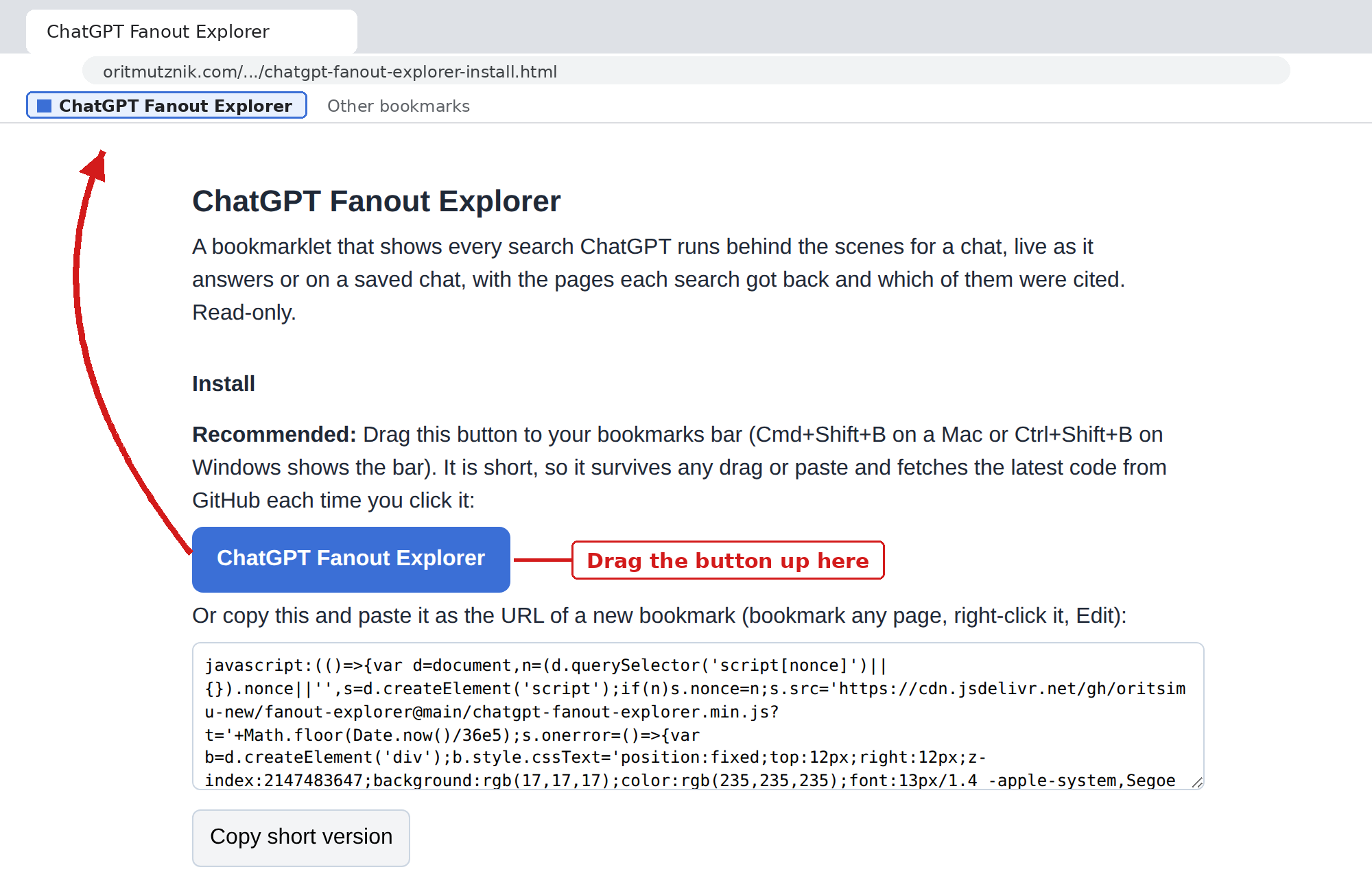
- Drag the button: Open the install page in Chrome, Edge or Brave and drag the blue button onto your bookmarks bar (Cmd+Shift+B on a Mac or Ctrl+Shift+B on Windows shows the bar). The button is short and fetches the latest code from GitHub each time you click it, so you never reinstall.
- Copy and paste, the safe route on Windows: On the install page press Copy short version, bookmark any page, right-click it, choose Edit and paste over the URL. Long bookmarks do not always survive a drag on Windows, while this always does.
- From GitHub: The code lives at github.com/oritsimu-new/fanout-explorer, where you can read it. Open
chatgpt-fanout-explorer.bookmarklet.txt, press Copy raw file and paste it as the URL of a bookmark, as in route 2. This is the standalone version, so it works even if GitHub is unreachable later. - Console route, for a company-managed browser: If your browser blocks bookmarklets by policy (look for
javascript://*under URLBlocklist atchrome://policyoredge://policy), open a chat on chatgpt.com, press F12, open the Console tab, paste the code from route 2 or 3 and press Enter. Chrome asks you to typeallow pastingthe first time. If DevTools is blocked as well, a personal browser profile is the only way around it.
I keep mine at the far left of the bar, so it is the first thing I see on a chat. Below is the install page as it opens, with the button and the spot on the bookmarks bar it goes to.
- Go to chatgpt.com, logged in, in the browser where you installed it, because the desktop app has no bookmarks bar.
- New prompt: Open a blank chat, click the bookmark, then send your prompt and the panel fills batch by batch. The order matters: Click first, then send, or the queries are lost.
- Saved chat: Open the chat and click the bookmark, which takes a second on the first read and is instant after that. You get the pages and citations, while the queries need the bookmarklet running when the prompt was sent.
- If clicking it does nothing at all: Right-click the bookmark, choose Edit and check the URL starts with
javascript:(. If it is empty, short or the install page address, the drag did not take, so use route 2.
Inside the bookmarklet: The Table, Index and Types tabs
Table tab: The searches, one per row
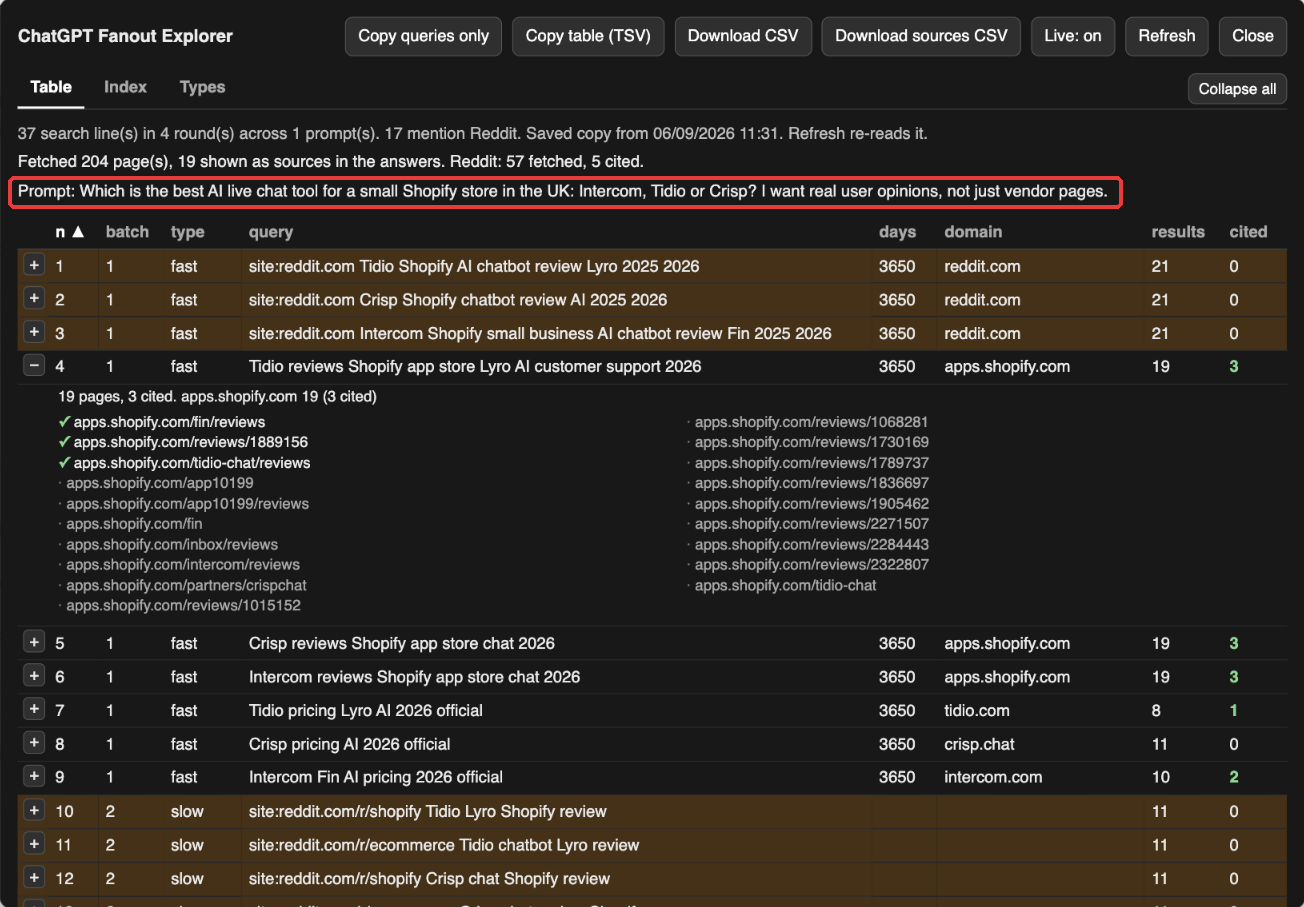
This is the most important view, it’s the default and the one I spend most of my time in. Here is the example prompt used throughout this post:
Which is the best AI live chat tool for a small Shopify store in the UK: Intercom, Tidio or Crisp? I want real user opinions, not just vendor pages.
For that prompt ChatGPT ran 37 searches in 4 batches, fetched 204 pages and used 19 of them as sources in its answer, while 57 of the pages were from Reddit and 5 of those were used. Reddit and the review sites appear in this fan-out, which I think is because the prompt asks for real user opinions, a request for outside validation. When I do not ask for it, Reddit is harder to replicate, as the Shopify vs WooCommerce prompt further down shows. Below, the prompt (in red) and the summary lines come first and row 4 is expanded in this view: A search limited to apps.shopify.com that returned 19 pages, with ticks on the 3 review pages ChatGPT used, all 3 from the app store because the search was limited to that site.
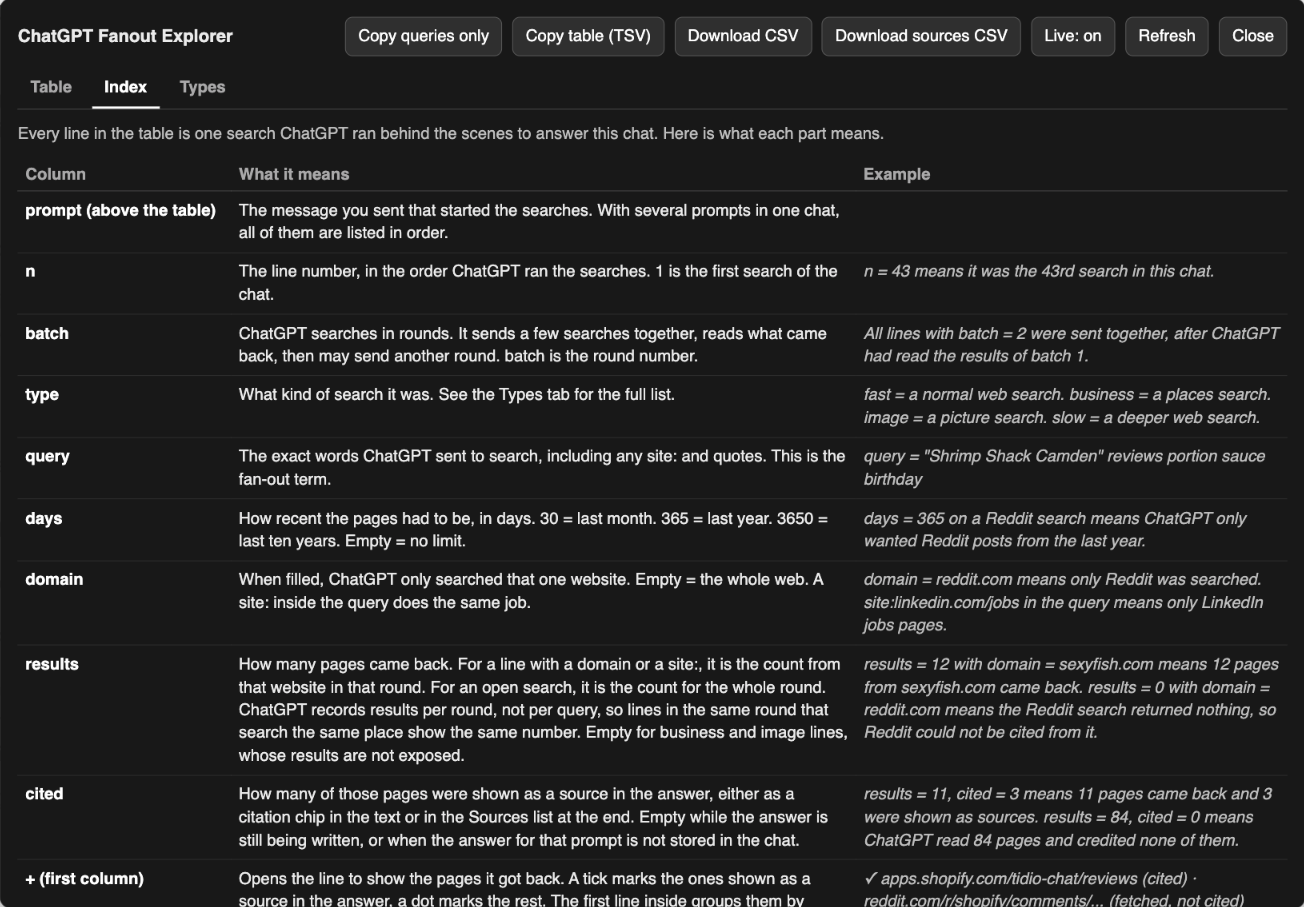
Index tab: Every column explained
The Index tab is a reference table, explaining the meaning behind every element you see on Fanout Explorer: The prompt line, each column (n, batch, type, query, fetched age, cited age, results, cited, plus days and domain on older chats), the Brands it searched line, the “+”, the summary lines, the highlighted rows (Reddit), the export-only columns, each button, sorting and the saved copies, live mode and rate limit behaviour, all with a simple description and an example.
Note: ChatGPT records results once per batch, so if two searches in the same batch look at the same website they share one set of pages and both rows show the same results number.
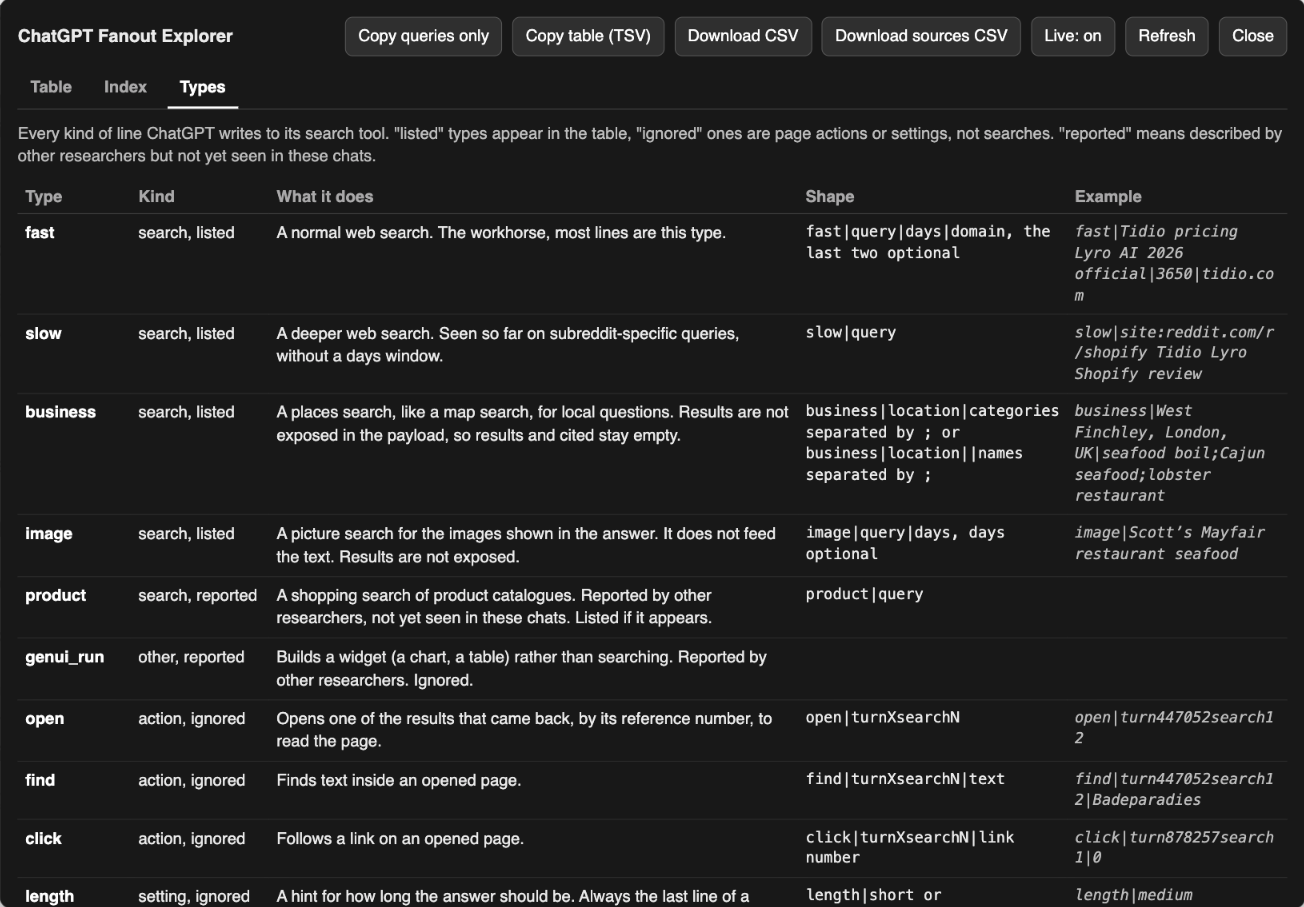
Types tab: Every kind of search line (from what I have seen so far)
ChatGPT sends each search to its search tool as one line of text and the first word of that line is the type. This tab lists every type with its shape and an example:
- Four known searches, which appear in the table:
fast(a normal web search),slow(a deeper one),business(a places search, like a map search) andimage(a picture search). - Two reported by other researchers that I have not seen yet:
productis a shopping search that will appear in the table if it turns up andgenui_runbuilds a chart or a table, so it is not a search and is ignored. - Instructions, listed here and left out of the table:
openreads a page that came back,findlooks for text on it,clickfollows a link on it andlengthsets how long the answer should be. - Result types, in the last row: Every page that comes back is tagged with where it came from, web search, news, places, images, Reddit or a page ChatGPT opened. Reddit pages carry their own tag, which suggests ChatGPT pulls them in through a separate route and weighs them separately.
Types that are not on this list will not have an explanation, because I have not come across them yet. The bookmarklet already knows a few more (news, video, finance, weather and sports) and will list those if they appear, while a type that is new to it will be skipped until it is updated, which you can do by editing the bookmarklet with Claude if you like.
Fanout Explorer in action: The anatomy of one prompt
Take the example prompt again, aiming to compare Shopify chat tools, where what the user wants is real opinions on 3 of them for a small UK Shopify store. What the web has is vendor pages, app store reviews, review sites and Reddit threads, so the fan-out shows which of those ChatGPT went for, what it read and what it used. I open two parts of it below, because they answer the two questions inside the prompt: Reddit for the opinions and the vendors’ own pricing pages for the costs.
Reddit: Sourced in every batch (where 3rd-party validation is in the prompt) but only cited in two
ChatGPT searched Reddit in all 4 batches: Reddit appears in 17 of its 37 searches, 57 of the pages it fetched were Reddit pages and it used 5 of those threads.
| Batch | What ChatGPT searched | Reddit pages back | Cited |
|---|---|---|---|
| 1 | 3 fast (normal web) searches, site:reddit.com plus each vendor’s name, limited to reddit.com with a 3,650 day (10 year) window* (presumably its way to assess trust and expertise) | 21, every one of them on es.reddit.com, from subreddits such as r/350z, r/DACA and r/rockhounds, with one r/shopify thread among them | 0 |
| 2 | 6 slow (deeper web) searches aimed at r/shopify and r/ecommerce with the vendor names | 11, 10 of them from r/shopify | 0 |
| 3 | 5 fast (normal web) searches with the brand names in quotes, such as site:reddit.com "Tidio" "Crisp" chatbot | 6 | 3 |
| 4 | 3 fast (normal web) searches with a subreddit and quoted brands, such as site:reddit.com/r/shopify "Crisp" chatbot Shopify | 21, 11 on www.reddit.com and the rest on old.reddit.com or locale copies such as pl., th. and zh.reddit.com, with 7 of the 21 being user profiles | 4, two of them new |
Batch 3 is where Reddit was first cited. Below are the 5 searches of that batch, each with the brand names in quotes and each returning 6 pages with 3 used, plus row 23 open with ticks on the 3 threads that made the answer.
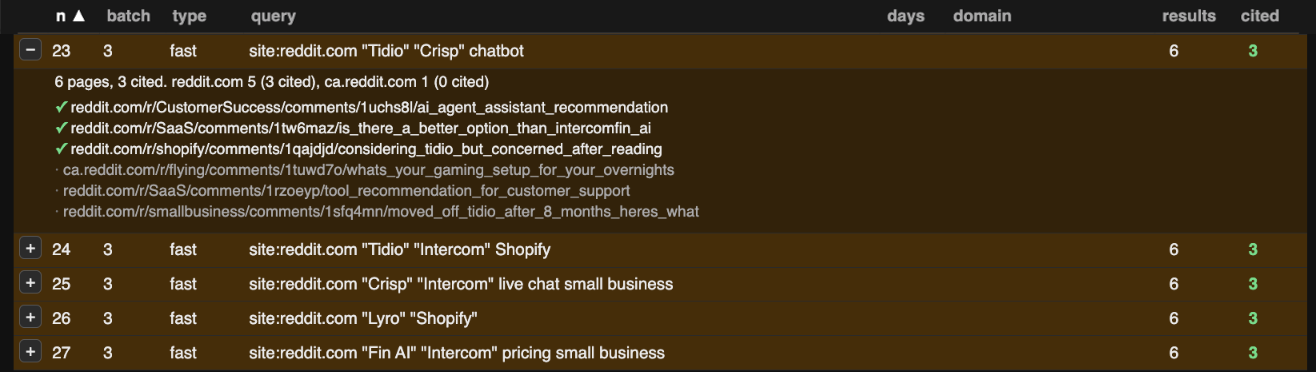
What this shows:
- The threads ChatGPT used all name the products and ask the buyer’s question: An r/CustomerSuccess thread asking for an AI agent recommendation, an r/SaaS thread asking for a better option than Intercom Fin, an r/shopify thread from someone considering Tidio, an r/intercom thread on cutting the Fin bill and an r/shopifyDev thread on integrating a chatbot.
- The broad sweeps produced nothing usable: The
site:reddit.comsearches in batch 1 came back with 21 off-topic pages from a Spanish locale subdomain, while the subreddit-only searches in batch 2 came back with relevant r/shopify threads that were read and passed over. Reddit was used only once ChatGPT searched it with the product names in quotes. - The prompt decides whether Reddit is sourced at all: This one asked for real user opinions, which is why ChatGPT went to Reddit from the first batch. Ask the same question without that line and the Reddit rows may not appear.
What I would do with that, for a brand or a client: Find the threads ChatGPT is already using in the category, check how the product is described in them and answer the question there where it is welcome. Where Reddit is fetched and never used, work on the pages that are cited instead, because those are the ones ChatGPT trusts for that question. And run your own prompts before you believe any of this, mine included: It is one prompt on one day.
The vendors’ own pricing pages: Wanted from batch 1 but only found in batch 3
The prompt also needs pricing, so the fan-out shows ChatGPT going to each vendor’s own site for it, with “official” in the query and a 3,650 day (10 year) window*. Below are the 3 searches on crisp.chat, one per batch, with the third open to show the 4 pages it returned and the 2 that were cited.
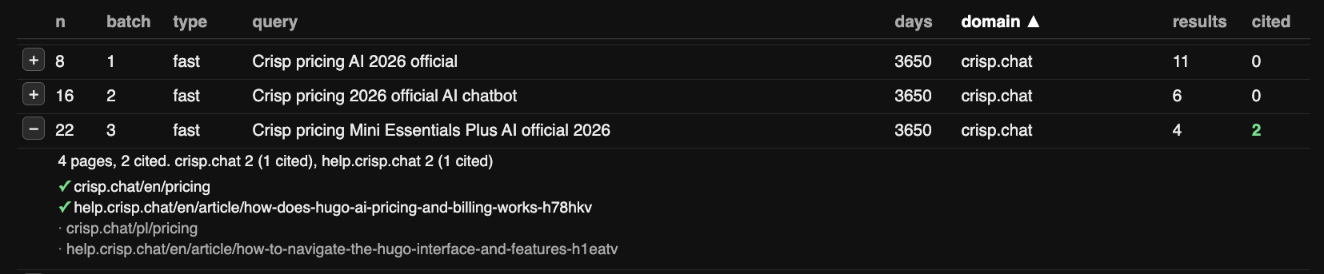
What the 3 searches on crisp.chat show:
- The pricing page was missing from the first two searches: Batch 1 asked for “Crisp pricing AI 2026 official” and got 11 pages of blog posts, feature pages, terms and help articles, then batch 2 got 6 more of the same, which matters because a page that does not come back cannot be cited.
- ChatGPT rewrote the query with words it learned on the way: Two of the batch 2 pages were help articles for the Mini plan and the Plus plan. Batch 3 asked for “Crisp pricing Mini Essentials Plus AI official 2026”, the pricing page surfaced at last and was cited, alongside a help article on how the AI add-on is billed.
- Two of the 4 pages came back but were never going to be used: They were the Polish copy of the pricing page and a help article about navigating the interface.
- The competitors each tell a different story: The same search on tidio.com cited the pricing page itself in batch 1, while on intercom.com it fetched the pricing page and the pricing calculator, passed over both and cited 2 help centre articles explaining Fin’s plans, so one prompt produced 3 different reasons a pricing page does or does not get credited, one per vendor.
If I were working on Crisp, in house or for a client, I would find out why the pricing page does not come back for a search that literally says “Crisp pricing”, put the plan names and the AI billing rule in plain text on the English pricing page, keep one help article per pricing question, sort out hreflang on the locale copies and rerun the prompt monthly, aiming for cited in batch 1, like Tidio.
Bonus: A prompt where Reddit did not appear, despite my expectation
To see the other side of it, here is a second prompt, typed as it was sent:
compare shopify vs ecommerce for a small ecommerce
ChatGPT read it as Shopify against WooCommerce and ran 4 searches in a single batch, every one of them limited to shopify.com or woocommerce.com with a 30 day window*: Shopify UK pricing, WooCommerce pricing and hosting, Shopify transaction fees and WooCommerce payment fees. It fetched 42 pages and cited 4, two from each vendor: The Shopify UK pricing and about pages, the WooCommerce pricing page and its WooPayments fees document. There were no review sites, no comparison articles and no Reddit anywhere in the fan-out, so ChatGPT clearly has a lot of relevant context on these brands already, without the need to re-validate through 3rd parties like Reddit and review sites. Below, the prompt is in red and row 1 is open, with both cited pages on shopify.com because the search was limited to that site.
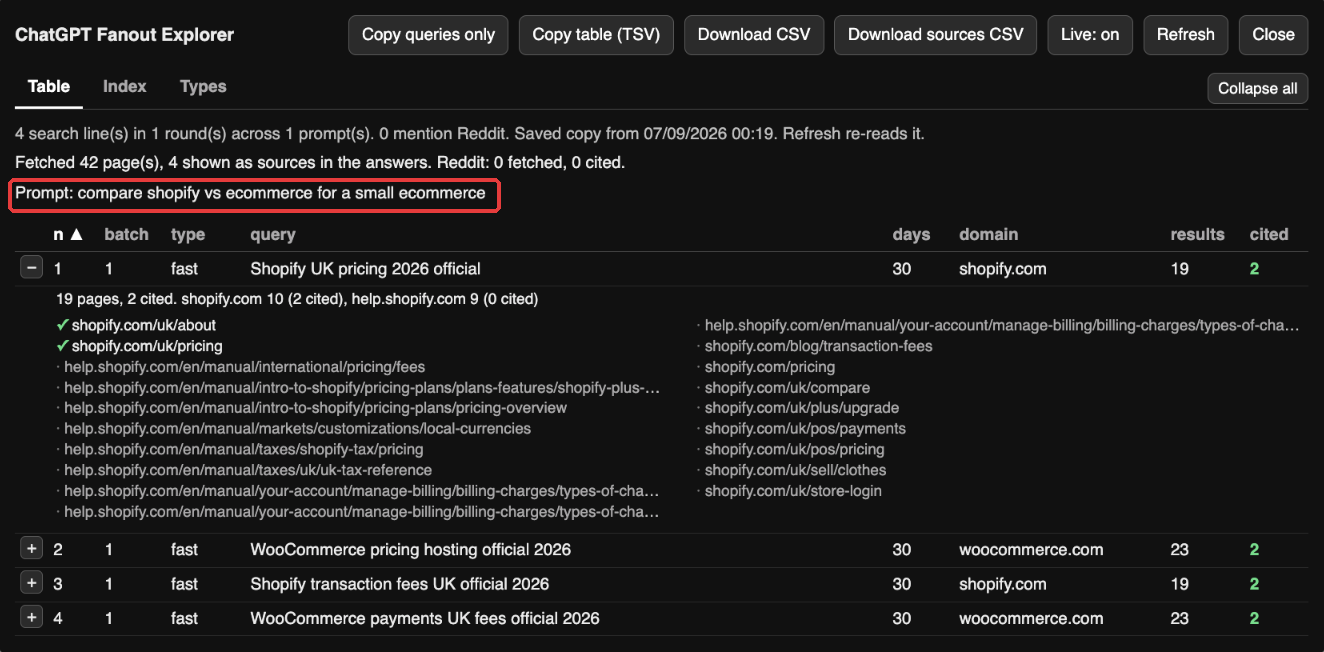
These two prompts lead to two different fan-outs: Ask for real user opinions and ChatGPT goes to Reddit, the app store and the review sites, while a comparison of two well-known platforms sends it to the two vendors and nowhere else, with a 30 day window in place of the 10 year one. While this could mean that 1st-party brand proof outweighs 3rd-party proof for a question like this one, it is still worth investing in 3rd-party proof, on review sites, Reddit and the like, for the potential customers who will ask for it specifically, as the first example prompt did. That is the point of the tool: The prompt decides where ChatGPT looks, so the only way to know for your category is to run your prompts and read the rows.
How to use Fanout Explorer for your AI search research
Whatever acronym you prefer, AEO, GEO or LLMO, the work underneath is the same and it comes down to this:
Find out what ChatGPT searches for, what it reads and what it trusts, then close the gap for your brand or your clients.
Here is what the bookmarklet gives you for each part:
- A prompt set built from real fan-outs: Run the prompts your customers would ask and copy the queries with one click. You get a keyword list that ChatGPT wrote, more direct than anything a keyword tool suggests and often with the year or the words “official” or “reviews” added. It is the fastest route I know to stage 2 of an AI search visibility audit.
- Which sites ChatGPT reads and which it credits: The results column shows that pages from a site came back for a search, while the cited column shows whether ChatGPT went on to use them. Read together, they tell you that a site which keeps coming back and never gets cited, yours or a competitor’s, is being read and passed over, which needs a different fix from a site that never comes back at all. It is a quick version of the citation source audit.
- The Reddit question for your own category: Sort by domain and read the highlighted rows. If Reddit threads are fetched and cited, the forum is winning that answer, so find those threads, check how your product is described in them and answer the question there yourself where you can (caution and experience are advised, preferably through a dedicated Reddit marketing team, agency or professional). If Reddit is fetched and never cited, ChatGPT reads it for background and credits someone else, so the pages that are cited are the ones to work on.
- The sites ChatGPT already trusts for your category: * When the domain column is filled, or the query carries a
site:operator, ChatGPT limited that search to one website, which means it treats that site as an authority for the question. In the example prompt: apps.shopify.com, g2.com, capterra.com and each vendor’s own site, plus Reddit. If your brand never appears there and your competitors do, that is the gap. Since September 2026 the domain column is empty on new chats, so read it from the opened lines instead, where the websites ChatGPT keeps fetching from are grouped with their counts. The Brands it searched line adds the brands it went looking for by name. - The freshness window each search asks for: * The days column, explained:
The days column is the recency window ChatGPT sends with a search. Suganthan reads it as a match for how fast an answer goes stale, 2 days for stock prices, 30 for commercial comparisons, 365 for category research and 3,650 for local searches, with Reddit searches seen at 365 and 3,650.
He flags that he has seen no spec for it, which matches what I see: Nobody has yet shown whether older pages are excluded or only pushed down. The example prompt used 3,650 days on every dated search and the bonus prompt used 30, so the window varies by prompt as well as by topic. His advice, which I share: A pricing or comparison page untouched for a month sits outside the 30 day window on the very queries where brands get compared, so make real updates to the pages that answer buying questions inside that cycle and date them visibly. Since September 2026 the window is gone from new chats, so the tool shows the other side of it instead: Fetched age and cited age. When the cited pages are newer than the pool they came from, freshness helped them get picked and the advice above still stands.
- The same prompt over time: Fan-outs change: ChatGPT rewrote the format of these lines in August 2026 and the searches it runs for the same prompt will differ from month to month. Every export includes the chat ID and the date and time it was captured, so run the same prompt next month, export again and put the two files side by side.
- Evidence for a client or your brand: For a quick share, Expand all and take a screenshot. For the full picture, Download CSV gives the table with every page each search returned and Download sources CSV gives one row per page with a cited flag, so the “why does ChatGPT keep recommending them” conversation, with a client or your own leadership, starts from data.
A possible workflow with ChatGPT Fanout Explorer
- Pick the 10 prompts your customers would ask in the categories you care about.
- Run each one in a fresh chat with the bookmarklet open, clicked before you send, or open the saved chats you already have for the pages and citations.
- Copy the queries into your keyword list.
- Sort by domain and note which sites came back and which were cited, yours and your competitors’.
- Read the Reddit rows and compare cited age with fetched age (the days column on older chats*).
- Download the CSV (plus the sources CSV when you need every page) and file them with the date.
- Fix the pages the table points at.
- Rerun the same prompts next month and compare the exports.
It is about half an hour a month, so you can answer “what is ChatGPT actually doing with our category” with data. If the bookmarklet breaks when the format moves again, or you want a second pair of eyes on what your fan-outs show, contact me here or on LinkedIn.
Fanout Explorer FAQs
Does the bookmarklet send my chats anywhere?
No. It reads the conversation from ChatGPT’s own API using the session you are already logged in with, builds the table in your browser and keeps a saved copy in your browser’s local storage so the chat opens instantly next time. Nothing is sent to me or anyone else. The short bookmarklet fetches its code from GitHub through jsDelivr, a public CDN, so jsDelivr sees the IP address of whoever clicks it, the same as any script served from a CDN, while the standalone version never contacts anything but chatgpt.com. The whole of the code sits in the box on the install page and on GitHub, so you or a developer you trust can read it before you use it.
Why are the results and cited columns empty on some lines?
The results column is empty for business and image searches, because ChatGPT does not expose what those return. The cited column is empty when the bookmarklet has no finished answer to check the pages against: While ChatGPT is still writing, or on some older chats where the stored conversation has no final answer for that prompt. A 0 in cited means it could check and nothing from that search was used.
Why does the query say not captured?
ChatGPT stopped saving the query text with the chat in September 2026. It still streams the first batch of queries to your browser while it answers and that is the only moment they exist, so the bookmarklet has to be running when you send the prompt. A chat opened afterwards, including every chat from before you updated, shows its pages and citations with the query marked as not captured, for good. Batches after the first read “follow-up batch”, because ChatGPT never streams those. Work workspaces on paid accounts keep the queries in the saved chat and those are read as before.
Why does it say ChatGPT is rate limiting me?
ChatGPT returns a 429 when a browser reads conversations too often. The bookmarklet is built to avoid that: It only reads while ChatGPT is answering, a finished chat costs one read and a chat you have opened before costs none, because it comes from the saved copy. When a 429 does come through, it keeps what it has and waits before retrying, a minute at first and longer if it keeps happening, so you can still hit one if you open many fresh chats in a row, but the panel says so and recovers on its own.
Does it work in the ChatGPT desktop app, Safari or on Claude and Gemini?
This one reads ChatGPT’s conversation format only, so it will not work on Claude, Gemini or Perplexity. There are separate Claude and Gemini bookmarklets, compared in ChatGPT vs Claude vs Gemini fan-outs, plus a single install page with all three. It runs on chatgpt.com in Chrome, Edge and Brave on a desktop, logged in, on your own chats. The desktop app has no bookmarks bar and I have not tested Safari or Firefox.
Work with me on your AI search visibility
If you want help turning what the fan-outs show you into a content and citation plan, or a second pair of eyes on what ChatGPT is doing with your category, tell me what you are seeing.