

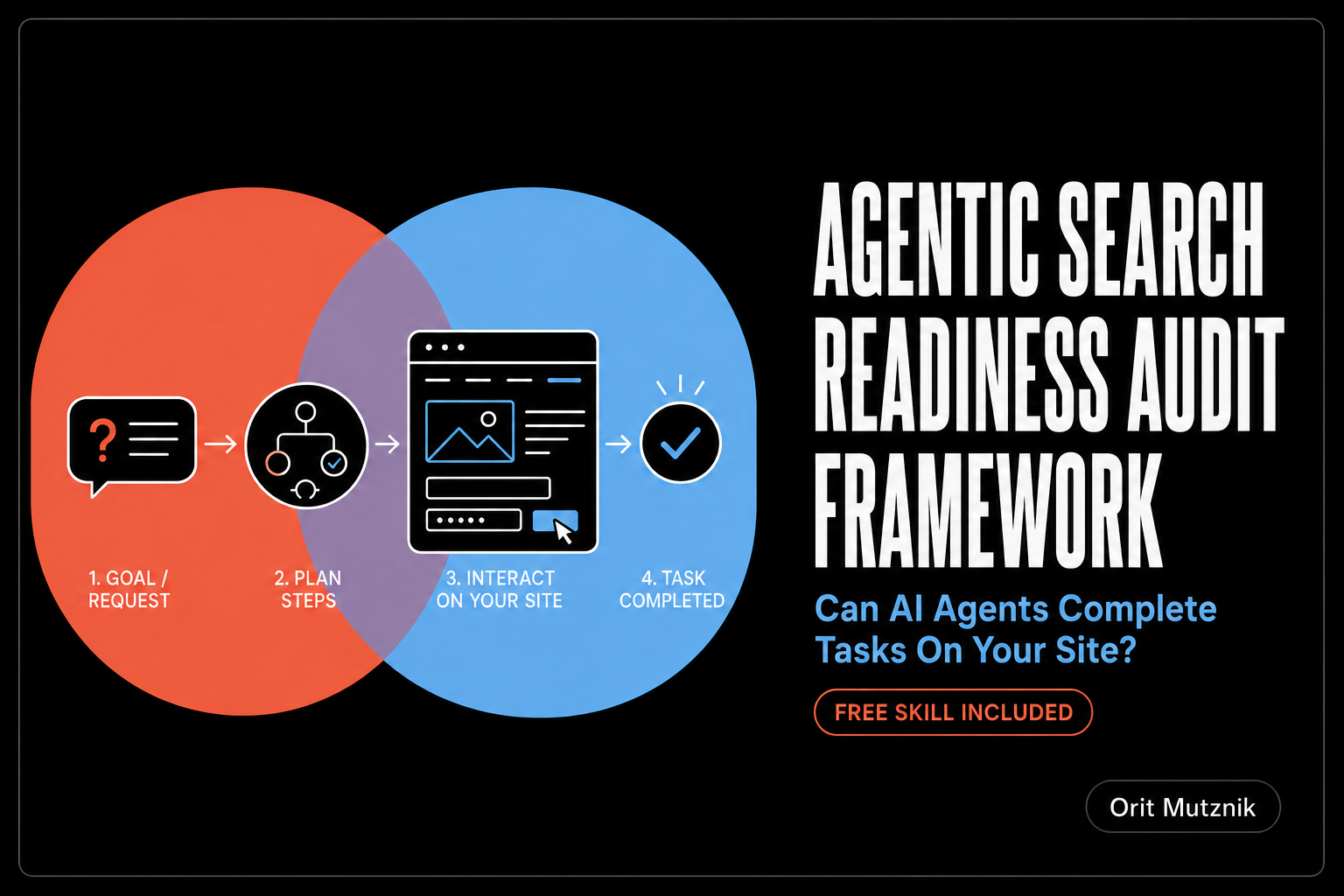
Where your website fails AI agents
An AI agent can find your page, read it, quote it back to its user and still fail at the one thing the user asked for. It reaches your pricing page and cannot tell which button starts a trial. It opens your booking flow, the layout moves under it and it clicks on nothing.
Google gave that problem a name in May 2026, when Lighthouse 13.3 added an Agentic Browsing category that scores how well a site works for AI agents, followed in June by an agent-ready toolkit for developers. The category is experimental and built on proposed standards, which Google clearly states in its own documentation. It matters anyway, because it is the first measurable definition of agent readiness we have been given.
Why AI agents fail on websites: The benchmark numbers
The published numbers, collected in TestMu‘s review of the 2026 benchmarks, are worth quoting to anyone who assumes agents already work.
- Online-Mind2Web, 300 everyday tasks across 136 real websites: The strongest agent finished 61.3% and most finished closer to 30%.
- WebGames: Humans reached 95.7% while the best AI system managed 43.1%.
- Mind2Web 2: The strongest system, OpenAI Deep Research, reached 50 to 70% of human performance on sustained multi-step work, while spending half the time a person did.
- GAIA: Agents have caught up to the 92% human baseline, which makes this the one benchmark here where they match us. GAIA scores question answering and tool use, so it measures a different job from sustained browser control.
The Online-Mind2Web paper itself (Xue et al., Ohio State and UC Berkeley, April 2025) sorted the failures into 5 types: Filter and sorting errors, incomplete steps such as never pressing submit, navigation errors, misunderstanding the task and a small bucket of everything else. For Operator, the strongest agent tested, filter and sorting errors were 57.7% of failures and navigation errors another 19.6%. Failed runs also took nearly twice as many steps as successful ones, mostly from repeated actions and unexpected pop-up windows. Filter controls, navigation and pop-ups all live on your page, which means most of what went wrong happened on territory a site owner can change.
My reading of those numbers is that they are a ceiling, because the benchmark ran on popular, heavily used sites. The only way to know where your site sits is to run stage 4.
TL;DR: The agentic search readiness audit in 60 seconds
What is agentic search readiness?
So how do you let agents actually do things on your site? That is the simple question hiding behind the term agentic search readiness. It is the question I set out to answer with the framework below, which I have also turned into a free skill you can run instead of reading the whole thing.
Agentic search readiness is how well your site works for an AI agent trying to get something done on it: Booking a demo, downloading a document, adding a product to a basket. Checkout and payment are a separate problem, covered by the Universal Commerce Protocol in my glossary.
A person looks at a page and works out what to click from the layout, the icons and the colours. An agent reads the code underneath and works from the names it finds there, a list browsers call the accessibility tree, so anything that only makes sense visually is invisible to it. Your basket icon is a picture to a person and an unnamed button to an agent.
The distance between those two readings is your agent readiness gap.
Your agent readiness gap is the distance between the page a person sees and the page an agent can act on.
Here is the short version of how this agentic search readiness audit framework measures that gap and what to fix when you find it.
- What it does: Puts a real AI agent through your most important tasks and traces each failure back to the HTML behind it.
- What it answers: Can an AI agent complete those tasks and, if it fails, at exactly which step does it give up.
- Why it is separate from AI search visibility: Visibility gets you into the LLM’s answer. Readiness gets the user through the task.
- How long it takes: Half a day for a first pass on 3 tasks, less with the skill.
- What you need: Chrome 150 or later, 3 to 5 real tasks and one AI agent that can click and type on a page for you.
- The 6 stages: Lighthouse baseline, accessibility tree, blocker sweep, real agent task runs, WebMCP decision and score and prioritise. Together they find the exact point where an agent stops and tell you which change fixes the most pages.
- The stage that matters most: Stage 4, the real agent task runs, because it is the only stage that produces evidence.
- The most common single fix: An unlabelled icon button in a global header. Four lines of HTML clears it site-wide.
- What the free skill does: Runs every stage except the agent task runs, which need a browser connected, then drafts the score and fix list.
- What you get at the end: A score for each task you tested and a fix list ordered by how many templates each fix clears.
What is an agentic search readiness audit?
An agentic search readiness audit tests whether an AI agent can complete real tasks on your website. It works through 4 questions in order.
- Discoverability: Can the agent reach the page and read it? This is the ground a visibility audit already covers and it is where most people stop.
- Interpretability: Can it tell what your buttons and fields do? Every control needs a name written into the code, because an icon a person recognises gives the agent nothing.
- Stability: Does the page hold still? An agent decides what to click, then clicks, so when the layout moves in between it hits the wrong thing.
- Completability: Does it actually finish the job? A real agent, on a real task, all the way to the end.
The fourth one is the audit, because it is the only one measured against reality. The first 3 explain the result.
Agent readiness is the established term for this and it is defined alongside the protocols and standards in my agentic search optimisation glossary if you want the vocabulary before the method.
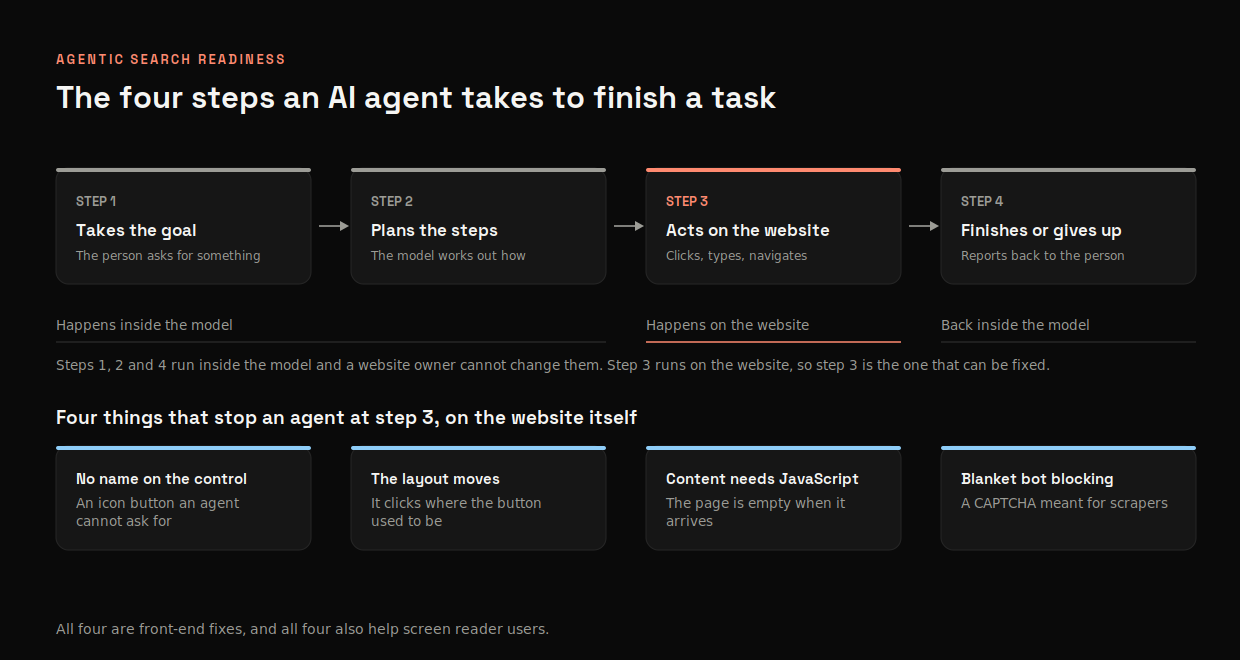
An agent doing a job for someone runs the same loop every time: It takes the goal, plans the steps, acts on the website, then finishes or gives up. Steps 1, 2 and 4 run inside the model, so no website owner can change them. Step 3 runs on your HTML and almost every failure I have looked at happens there.
Agentic search readiness vs AI search visibility: What is different
Both audits are needed and running one does not cover the other, which is how sites end up ranking well in AI answers with a checkout no agent can finish.
| AI search visibility audit | Agentic search readiness audit | |
|---|---|---|
| Question it answers | Are we in the answer and described correctly | Can an agent finish a task here |
| Typical owner | SEO and content | SEO and AI search, implemented by engineering |
| Fix looks like | Content, schema, third-party presence | HTML, CSS, front-end behaviour |
My view is that agent readiness belongs inside technical SEO. Semantic HTML, server-side rendered content, stable layouts and named controls are things our field argued for long before agents existed.
The overlap with accessibility work is close to total, so almost every fix that helps an agent also helps someone using a screen reader.
Agents have finally made the commercial case that accessibility advocates could never quite win.
Prerequisites to run an agentic search readiness audit
- Chrome 150 or later, which is the version that carries the Agentic Browsing category. Run it from DevTools (right-click the page > Inspect > Lighthouse tab > tick Agentic Browsing > Analyze page load), or install it locally with
npm install -g lighthouse@latestand runlighthouse --view [URL]. - A list of 3 to 5 real tasks your site exists to support: Start a trial, book a demo, download a document, contact support.
- At least one AI agent you can use: Comet Assistant, Claude in Chrome, or Chrome DevTools for Agents (the Chrome DevTools MCP server). These open your pages and click and type on your behalf. Any of them works, though the skill falls back to a manual run sheet if you have none.
- The raw HTML and the rendered page for a handful of key templates, so you can see what only appears after JavaScript runs. Quickest way is
curl -s [URL]against right-click > Inspect > Elements, or the View Rendered Source Chrome extension, which shows both side by side. - Optional, the WebMCP origin trial if you want that audit in stage 1 to return a real result. Register at Chrome’s origin trials page and add the token to your page. Skip it if you have already decided WebMCP can wait.
You do not need a developer for the audit itself, though you will need one for most of the fixes.
The Agentic Search Readiness Audit in 6 Stages
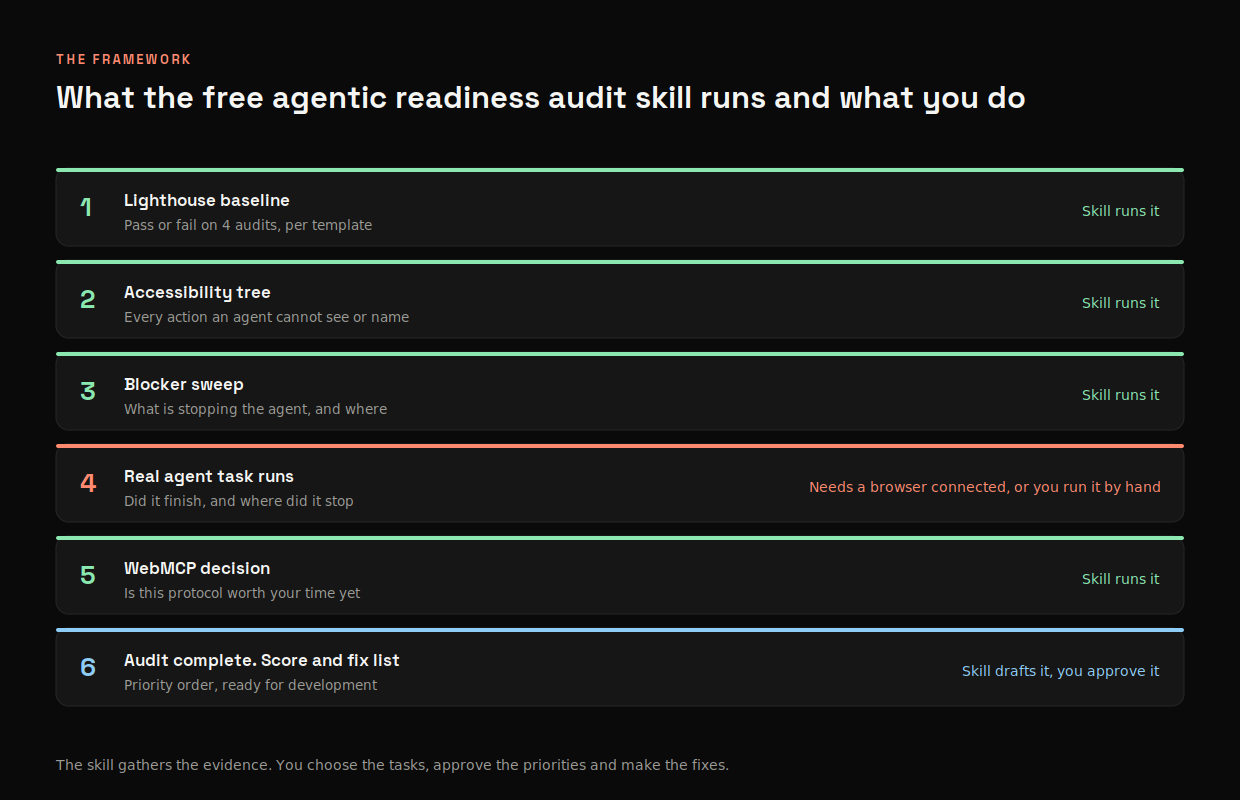
| Stage | What it produces | Can the skill run it |
|---|---|---|
| 1. Lighthouse baseline | Pass or fail on 4 audits, per template | Yes |
| 2. Accessibility tree read | Every action on the page an agent cannot see or name | Yes |
| 3. Blocker sweep. What is stopping the agent? | The 8 known blockers, found and located | Mostly |
| 4. Real agent task runs | Completion rate and the exact step that failed | Only with a browser connected |
| 5. WebMCP decision. Is this protocol worth your time yet? | A yes or no on adopting it, with reasons | Yes |
| 6. Audit complete. Score and fix list | Priority order, ready to hand to development | Drafted, then you decide |
Stage 1: How to run the Lighthouse agentic browsing audit
Run the Agentic Browsing category against your homepage, one template of each type and every page on your critical path, meaning the pages a user crosses to finish your most important task. Keep every report, because the category is still changing and a pass today may not be a pass in 3 months.
The category is made up of 4 audits.
| Audit | What it checks |
|---|---|
| Accessibility tree is not well-formed | Whether the simplified page structure agents read is properly formed, built on Lighthouse’s existing accessibility checks |
| WebMCP validation | Whether the page tells agents what it can do, in the WebMCP format, plus whether that description is valid. In other words, has your booking form been labelled so an agent can call it directly |
| llms.txt does not follow recommendations* | Whether an llms.txt file exists and meets the basics, including an H1, sufficient length and links |
| Detecting layout shifts | Your CLS score, the same number you already watch in a page speed audit. It matters more for agents, because a person sees the button move and follows it, while an agent has already decided where to click |
*The llms.txt audit is the one I would not lose sleep over. Ahrefs studied 137,210 domains in May 2026 and found that of the roughly 38,000 with a valid llms.txt file, 97% saw no requests for it at all. Publish one if you like, but a fail here is not a real problem.
There are 3 things to know before you read the result.
- It does not score like the other categories: You get a pass or fail per audit instead of a number out of 100. Google calls the result “informational and unbenchmarked”. DebugBear found that
example.com, a blank page with no AI features at all, scores a green 2 out of 2. Passing means you have not tripped 4 specific checks. It does not mean an agent can use your site. - The WebMCP audit needs you to opt in: It only returns a real result if you registered for the origin trial above. If you skipped that, this fails and the failure means nothing. Ignore it until you have made the stage 5 decision.
- The requirements are still moving: What passes today may fail in 3 months. Trust a failure, because it points at something real, while a pass only tells you one box is ticked.
Stage 2: How to read the accessibility tree an AI agent sees
The accessibility tree is the browser’s own summary of a page: A list of every control, what kind of thing it is and what it is called. Screen readers use it. So do browser agents.
Do this early and do it on the page that earns you the most, whether that is your top landing page or the first step of your checkout. A page that looks finished to you can turn out to be a list of unnamed buttons to an agent. Seeing that once is more persuasive than any argument.
Open DevTools, go to the Elements panel, then the Accessibility pane. That is roughly what a browser agent gets: Your page as a list of controls, each with a role and a name, none of your design. Anything with no name there is something an agent cannot ask for.
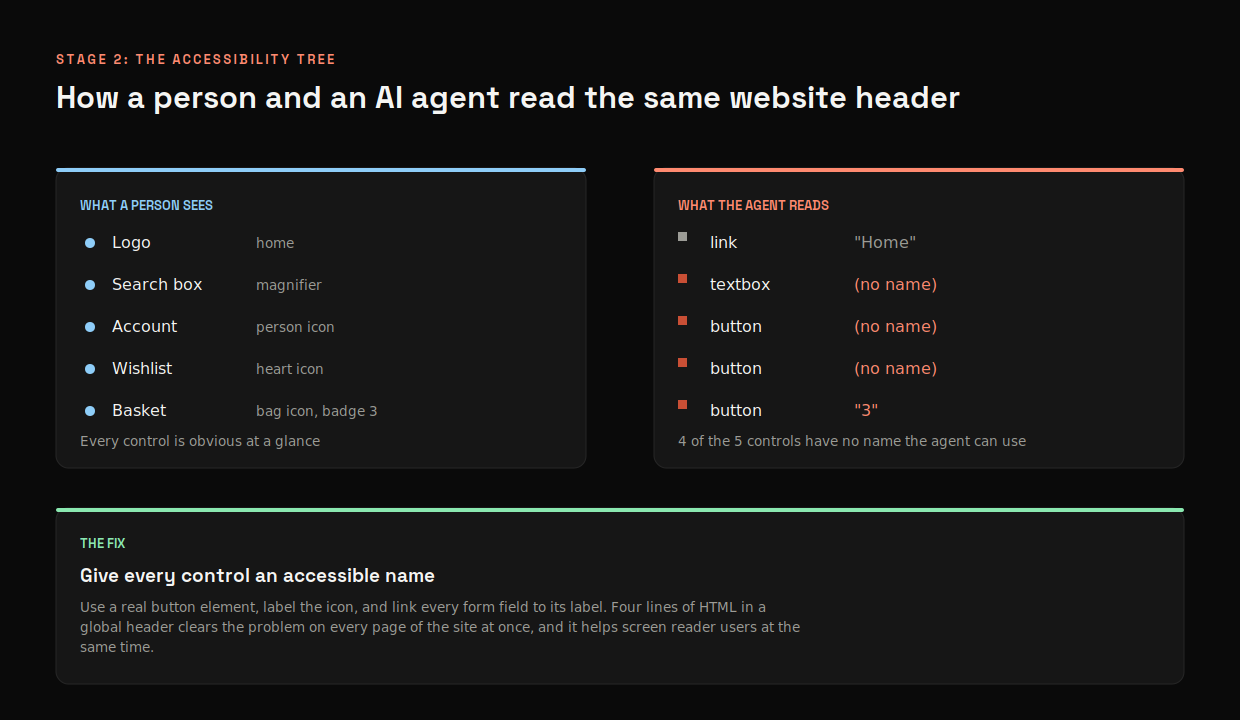
Work through your critical path and record 4 things per page.
- Controls with no accessible name: Icon-only buttons are the usual offenders, with search, close, filter and cart icons showing up again and again.
- Controls that are absent from the tree entirely: A
<div>styled to look like a button is not a button as far as the browser is concerned, so the tree never sees it. - Form fields where the label is only grey text inside the box: That text vanishes the moment someone clicks into the field, so it was never a label. The agent sees an empty box with no name.
- Controls whose name does not describe the action: “Click here”, “Submit” and “More” tell an agent nothing. The same name on several different buttons is worse, because the agent cannot tell them apart. Name each control after what it does: “Add to basket”, “Book a demo”, “Download pricing PDF”.
What to do with the output
The output is a list of elements with their locations. It is usually shorter than people fear, because the same few components repeat across the site. It is also more embarrassing than they expect, because the worst offenders sit in the header everyone has walked past for years. Sort it by where the element lives.
- Global header, footer or navigation: Fix first, because one change clears every page on the site.
- On the critical task path: Fix second.
- Everywhere else: Schedule it.
Show the unnamed icon in a global header first, because nobody argues with it and one of those matters more than 10 unnamed controls on a single landing page.
Stage 3: The 8 things that stop AI agents completing tasks
These are the recurring blockers, drawn from Searchviu’s work on optimising for AI browsers and matched against what the benchmark failure categories describe. Each one has a fix a front-end developer can action without a rebuild.
| Blocker | What it does to an agent | The fix |
|---|---|---|
| Unstable layouts | Elements move while loading, so the agent clicks empty space | Keep CLS low, set explicit image dimensions, reserve space for late-loading content |
| Non-semantic buttons | <div onclick> never reaches the accessibility tree | Use native <button> and <a>, or add role and tabindex |
| Unlabelled controls | Icon buttons and fields have no name to act on | Give every control a label and tie each form field to its own |
| Transparent overlays | An invisible layer intercepts the click | Remove them, or make them dismissible with a named control |
| Heavy client-side rendering | The page arrives blank and fills in once JavaScript has run. Some agents look before that happens | Server-side render the main content and the buttons that matter |
| Hover-only interactions | Menus that need a mouse hover are unreachable | Make them work on focus and click |
| Infinite scroll | The agent cannot tell where the list ends | Offer pagination or a clear endpoint |
| Blanket CAPTCHAs | Legitimate agents get caught by bot defences aimed at scrapers | Apply them at sensitive points only |
Sweep across templates rather than pages, because one fix in a header component usually clears the same blocker from several hundred URLs.
Here is what I say to budget stakeholders:
Seven of these 8 are accessibility fixes. They help screen reader users and AI agents at the same time, so the work you have been trying to get funded now has a commercial reason attached to it.
Stage 4: How to test your website with a real AI agent
Stages 1 to 3 tell you where an agent is likely to struggle. This stage puts a real one on your site to find out what actually happens.
Which AI agent should you test with?
The short answer is whichever you already have. The blockers that stop one agent tend to stop all of them, so getting a run done matters more than the choice.
| Agent | Good for | Watch out for |
|---|---|---|
| Comet Assistant | Closest to what a consumer actually uses today | Runs in Perplexity’s own browser, so your consent and bot rules may behave differently |
| Claude in Chrome | Runs in your real browser with your real session and reports what it saw at each step | Asks permission per site. Choose “Always allow actions on this site” the first time and it stops asking for that site. There is no allow-everything option, which is deliberate |
| Chrome DevTools for Agents | Best diagnostics, with logging and screencast alongside the run | Developer tooling, so it needs someone comfortable in DevTools |
| ChatGPT agent | Widely used, so worth one pass for coverage | Least visibility into why a step failed |
Test with two agents if you can. A failure both of them hit is your site, while a failure only one hits may be the agent. That saves time with engineering, because you can show the problem is not one tool behaving oddly.
How to write a task instruction an agent can follow
Write each task the way a customer would say it out loud, with a real detail in it: A price limit, a size, a date. That gives the agent a finish line it either reaches or misses.
- “Find a waterproof walking jacket under 120 pounds in a medium and add it to the basket”: Tests filtering, choosing a size and the basket in one run. Stop at the basket, because agent checkout and payment run on the Universal Commerce Protocol and that is a separate piece of work.
- “Book the earliest available demo next week”: Tests a calendar, a form and a confirmation.
- “Download the pricing PDF and tell me what the enterprise tier includes”: Tests a gated asset and whether the gate can be passed.
“Look at the pricing page” gives the agent nothing to finish or fail. “Tell me the price of the enterprise plan for 50 users” has an answer you can check.
How many times to run each task
Run every task 3 times. The same agent given the same instruction does not behave the same way twice, so one failure can be bad luck and 3 in the same place is a finding. Same logic as prompt testing in the AI search visibility audit: One screenshot is an anecdote, 20 runs are evidence.
What to record on every agent run
- Outcome: Completed, partial or failed, where partial means the agent reached the final step and did not finish it.
- The step it stopped at: Described the way a user would describe it, so “could not find the size dropdown” instead of a CSS selector.
- What it clicked instead: Usually the single most useful line in the whole audit, because it shows you which element the agent mistook for the one it wanted. That is your fix.
- Elapsed time: An agent that takes 4 minutes on a 30-second task will be abandoned by its user.
- Whether the 3 runs agreed: Different results on the same page usually point at a timing or layout problem. Run it another 3 times before you raise it, because timing faults are the ones most likely to be luck.
How to read your agent test results
Three patterns come up again and again, each pointing somewhere different.
- All 3 runs fail at the same step: Something on the page is broken for agents. It is almost always already in your accessibility tree list or your blocker sweep. Go and look it up.
- Runs fail at different steps each time: A timing problem, so look at layout shift, late-loading content and anything that moves after the page first appears.
- Runs complete but take several times longer than a person would: The agent is exploring because the path is not legible, which usually points at unclear naming.
Safety rules before you run an agent on your site
- Stop before anything irreversible: Halt at the step before payment, form submission or account creation. Record that it reached the gate and count that as completed.
- Never hand an agent credentials or payment details: Testing what happens behind a login is worth doing. It is its own exercise. Agree it first with whoever owns the account.
- Flag prompt injection as a security risk: Text on your page can carry hidden instructions an agent reads and follows. It sits at number one on the OWASP LLM Top 10 with no complete fix. Reviews, comments and third-party embeds are the usual routes in. Raise it with your security team.
Stage 5: Do you need WebMCP?
WebMCP is a way for a page to tell an agent what it can do, in writing, instead of leaving the agent to work it out by looking. Your booking form would say it takes a date, a party size and an email, then returns a confirmation. The agent reads that and uses it directly. It is one of several agent protocols and the glossary covers the rest, A2A, ACP and AP2 among them, with a status flag on each.
My position on it:
Test WebMCP and use what it tells you as one more source of insight. Do not build your agent strategy on it yet, because it is still experimental and no agent is obliged to use it.
Google calls it experimental in its own documentation. Whether it pays off depends on the standard settling and on agents choosing to support it. Neither is decided. The 8 blockers in the blocker sweep, stage 3, affect every agent visiting your site today, so fixing those pays off straight away and keeps paying off even if WebMCP never materialises. A form with properly named fields is most of the way there already.
I would move sooner in 3 cases.
- Your purchase flow is genuinely complicated, such as booking flights with connections, where even a person has to concentrate.
- You can already see agent traffic in your logs and those agents are bringing you customers.
- Your front-end team has time and wants to try a new standard early. Google’s toolkit includes a skill that hands the build to a coding agent, which makes this cheap to try.
The mistake to avoid is doing WebMCP instead of naming your controls. Lighthouse scores both, so you can pass the WebMCP audit, fail the accessibility tree audit and still end up with a better score on a site agents cannot use.
Stage 6: How to score agent readiness and prioritise the fixes
Score each task path out of 100.
| Component | Weight |
|---|---|
| Task completion rate across runs | 0.40 |
| Accessibility tree, how many controls are properly named | 0.25 |
| Blocker count from the blocker sweep | 0.20 |
| Layout stability | 0.10 |
| Discoverability basics (including an optional llms.txt) | 0.05 |
I weight completion at 0.40 because it is the only component measured against reality and everything else predicts it.
Discoverability basics means what lets an agent reach the page at all: A 200 response, no robots.txt or firewall rule blocking agent user agents, a working sitemap and a clean canonical. llms.txt sits here at the lightest weight, for the reason in the footnote above.
Sort your fix list by how many pages each change repairs, ahead of how serious each problem looks on its own.
Then order the fixes by how many pages each one affects: One unnamed button in a global header is worth more than 10 broken controls on a single landing page, because fixing it repairs every page at once. Most audits sort by how bad each problem looks and end up fixing rare things first.
Then hand the list to your engineering or development team and let them assign the owners, because who does what varies by company. Your job is to describe each fix clearly enough that they can route it without coming back to you (about the nature of the tasks themselves): What is broken, which pages it affects and what the page should do instead.
How to tell whether AI agents are already visiting your site
Ideally, run the audit before you have agent traffic, the same way you fix a checkout before the sale arrives. It is easier to get scheduled once you can show someone the traffic, so pull the evidence while you are in there.
- Server logs (log file analysis), filtered by user agent:
ChatGPT-UserandPerplexity-Userare people asking an assistant about you in real time, whileGPTBotandClaudeBotare crawling for training. Those are different jobs with different implications and the AI Search Optimisation 101 guide breaks the full crawler list down by what each one is doing. Platforms like Lumar or Botify will do this at scale, making the process substantially quicker and easier. - Sessions with no referrer that behave oddly: Very short dwell times on deep pages, no scroll and a jump straight to a form are all consistent with an agent acting on someone’s behalf.
- Your consent banner’s dismissal rate: A rising share of sessions that never dismiss the banner and never proceed is a sign that something is arriving and getting stuck.
While none of this gives you a clean number from logs alone, because a browser agent working inside a normal Chrome session sends the same user agent a person would, this is changing. Detection tools now spot browser agents from runtime and behavioural signals instead of the user agent string, such as automation traces and click patterns too precise to be human. Web Bot Auth lets “well-behaved” agents sign their requests so you can verify them. AWS added an AI activity dashboard to WAF in February 2026 covering 650+ bots. None of this is a finished standard yet. Web Bot Auth is still an IETF draft, so treat what you find as a signal that the audit is overdue.
How often should you run an agentic search readiness audit?
- Twice a year: The full 6 stages.
- Monthly: The real agent task runs on your most important task. A task that worked last month can break because a third-party script updated or someone redesigned the cookie banner. Nobody will tell you.
- After every front-end release that touches navigation, forms or checkout.
- After any change to bot protection, including CAPTCHA settings and WAF rules (web application firewall, the filter that blocks suspicious traffic before it reaches your site, which can catch agents by mistake).
What the free agentic search readiness audit skill does
Similar to my SEO audit skill and the AI search visibility audit, give it a domain and 3 to 5 tasks, then it works through the 6 stages and writes the result up as a Word document with the scorecard and the fix list.
Worth being clear about which parts it does for you and which parts still require actions from you, because the agent task runs produce the evidence and they are the one stage a skill cannot always reach alone.
Which stages the skill runs for you
It runs the Lighthouse baseline, the accessibility tree read, the blocker sweep and the WebMCP decision end to end, then drafts the scorecard and fix list with the weighting applied and the fixes ordered by reach. Where it cannot run Lighthouse itself it gives you the command and reads the output you paste back. It will not recommend WebMCP while your accessibility tree still has serious findings.
What you will still need to do
- Stage 4 needs a browser: With Claude in Chrome or Chrome DevTools for Agents connected, the skill runs the tasks itself. Without either, it gives you a ready-made sheet listing each task and each run, you do the runs yourself and note what happened, then paste that back in and it does the scoring.
- You choose the tasks: It proposes them from your navigation and primary calls to action and you confirm them, because only you know which journey actually earns the money.
- You make the prioritisation call: It orders the fix list by reach and assigns owners. What your team schedules next quarter is a conversation about capacity that no skill can have for you.
- Authenticated flows are off by default: Handing an agent credentials is a decision to make deliberately, so the skill asks before going anywhere near a login.
What the skill will never do
- It will not fix anything: It finds and prioritises. Every fix in the output needs someone with commit access.
- It cannot run every agent: It drives the browser tooling you have connected, so a result from one agent is one agent’s result.
- It will not invent completion rates: Where it cannot run a task, it says so and hands you the sheet, in the same way the visibility audit refuses to guess at platform numbers.
- It will not take an irreversible action: It stops at the step before payment, submission or account creation and records that it reached the gate.
Download the free agentic search readiness audit skill
Download the agentic search readiness audit skill
How to install the agentic search readiness audit skill
- Download the file above.
- Open Claude, go to Settings, then Capabilities, then Skills.
- Choose Upload skill and select the file.
- Ask Claude to run an agentic search readiness audit on your domain.
The main reason to run this audit now rather than waiting for next year: Cloudflare reported in August 2026 that daily AI agent requests across its network grew by more than 1,700% year on year, with machines now generating more than half of all the traffic it sees. Some of that traffic is already reaching your site. People and agents want the same thing from your pages: To find the right control and use it. A person works that out by looking, while an agent needs it named in the code, which is exactly what this audit checks and what you need to enable on your website today.
Agentic search readiness audit FAQs
What is an agentic search readiness audit?
It tests whether an AI agent can complete real tasks on your website, instead of only checking whether it can find and read your content. It combines Lighthouse’s Agentic Browsing category, an accessibility tree review, a sweep for 8 known blockers and timed runs of real tasks by a real agent.
Is agent readiness different from AI search visibility?
Yes. Visibility asks whether you appear in AI answers and are described correctly. Readiness asks whether an agent arriving on your site can finish what the user asked for. A site can score well on one and badly on the other.
Do I need WebMCP to be agent ready?
No. WebMCP is a proposed standard for telling agents what your page can do, which Google’s own documentation calls experimental. The 8 common blockers (stage 3, the blocker sweep) affect every agent visiting your site today, so fix those first, then test WebMCP once your controls are properly named.
How accurate are AI agents on websites right now?
On Online-Mind2Web, 300 tasks across 136 real websites, the strongest agent completed 61.3% and most completed closer to 30%. On WebGames, humans scored 95.7% against the best AI system’s 43.1%.
Does agent readiness help SEO?
Most of the fixes are things technical SEO already recommends: Semantic HTML, server-rendered content, stable layouts and labelled controls. The overlap with accessibility work is close to total, so the same changes help screen reader users.
How often should I run an agentic search readiness audit?
I recommend twice a year in full, monthly on your single most important task, then again after any release that changes navigation, forms, checkout or bot protection.
Can I run an agentic search readiness audit without a developer?
Yes for the audit. All 6 stages need Chrome, an agent and a few hours. For the fixes you will need a developer, because naming controls, changing how pages render and steadying the layout all need someone who can change the code.
Work with me on agentic search readiness
If you want a second opinion on what an agent runs into on your site, or help turning the fix list into something your engineering team will actually schedule, tell me what you are seeing.